Good Morning, ZBrush Nation,
I’m trying to build some competence with retopology, and I’m puzzled about what causes holes in the adaptive skin. I’ve attached three images as examples.
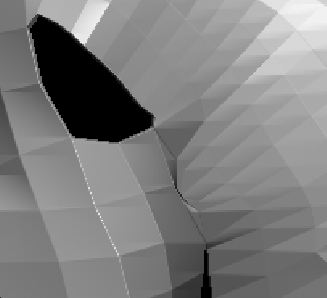
The first image shows a hole in the adaptive skin. Originally, I just blocked in the topology with large quads. There was no hole until I started to make subdivisions. So the hole apparently was caused by the way I subdivided other areas of the mesh.
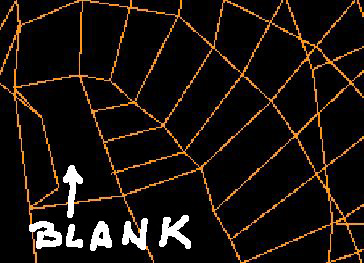
The second image shows a wireframe of the topology lines where the hole is. There’s a quadrangle labeled “blank” because there are no fill lines (no subdivisions). To the right of that is a quadrangle that has been subdivided into 4 smaller quads. To the right of that are 6 lines that attach to a larger area.
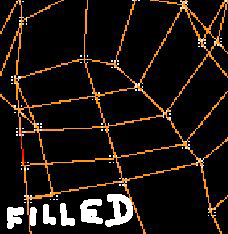
In the third image (HoleFix), the “Blank” area has been “Filled”; i.e., it has been subdivided to correspond with the adjacent quad. This fixes the problem; however, I have no idea why.
I thought that as long as the topology was drawn with some combination of quads and triangles (preferably quads) it was all good. So, I don’t see what caused the hole or why the fix fixed it. I know there’s a logic to drawing topology based on what the flow of the sculpting will be. Is there any kind of technical guide as to what I should do to avoid holes in the mesh? (Probably hire some else to do the topology, but I can’t afford it.)
Attachments