Hi, I’m not sure if anyone can help me with this or not…
I haven’t played with Zbrush 3.0 for a while now and today I decide to finally learn it. I am really enjoying the tutorials I’m finding on this site, and across the web yet I decided that I should be using my tablet for better results.
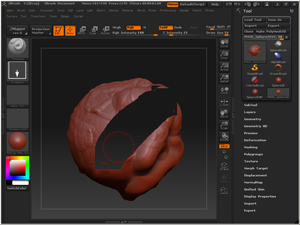
I am using a Graphire 4 Wacom tablet, and seemingly when I start to glide the pen across the surface I’m working on, it completely disappears…as if I’m erasing the entire sphere, yet when I rotate the object with the pen it has done what it is suppossed to do either adding or taking away.
I’m not sure if there is a setting of sorts in order to make a graphire 4 tablet function correctly with Zbrush or not. I am not having any issues with my mouse at all, so I’m not sure why it would be doing this only when I use the wacom as the pointer.
If anyone has any ideas it would be great to hear so I can use my Wacom with Zbrush.
I attached a pic of what it is doing when I use my wacom…
Attachments
 I would check if you have the latest driver for your Wacom.?