yeeeah… but for me it’s not big problem at all even fact that maya overcustomized perhaps%)
but anyway waiting for better solution =)
yeeeah… but for me it’s not big problem at all even fact that maya overcustomized perhaps%)
but anyway waiting for better solution =)
Thank you sir!!! Works.
I’ve tried all the above steps, and it still forces a new instance of Maya for me.
Win7 64bit
Very annoying. Wish Pixologic would address this. For us, GoZ is still not there.
I have managed to solve this.
First try this
C:\Users\Public\Pixologic\GoZApps\Maya\shelf_GoZBr ush.mel
into:
C:\Users\yourName\Documents\maya\2011-x64\prefs\shelves\
Then to get rid of the multiple instances I added:
eval (“source “C:/Program Files/Autodesk/Maya2011/scripts/startup/GOZScript.mel””);
to userSetup.mel (thanks pid18000!). This file lives in:
C:\Users\yourName\Documents\maya\2011-x64\prefs\scripts\
It’s working perfect now.
Once you have them all sourced up, you need to edit that GoZ button in maya a little. You need to access it through the Shelf Editor once GoZ installed it correctly for you. By default it should look like something like this.
source “C:/Users/Public/Pixologic/GoZApps/Maya/GoZBrushFromMaya.mel” ;
Just add one more line below the first line.
source “C:/Users/Public/Pixologic/GoZApps/Maya/GoZBrushFromMaya.mel” ;
source “C:/Users/Public/Pixologic/GoZApps/Maya/GoZScript.mel” ;
So now everything when u send something to ZBrush, it will source the GoZScript and will ‘listen’ to any updates from Zbrush. This should stop it Zbrush from launching another Maya when you GoZ it back to maya.
Hope it helps
Thanks Yung, thats fixed mine, although you need to exit maya after changing the shelf commands, rather than GoZ’ing straight away. Thats what I found anyways, at least its fixed 
Well, it helps a little. I finally got the Shelf button to work out (Thanks!). As far as the instances of Maya’s, I can’t seem to get the suggested code I added to the “Second Line of the Code for the GoZ button” to work. This bit of code is supposed to disable Maya from Launching into a new instance? I tried restarting Maya too.
Can you carefully explain the steps for allowing GoZ to import my current ZBrush tool into my current Maya Scene, which is already open?
I’ll keep trying!
Many thanks for the explanations. I tried everything exactly as described, but ZBrush still opens a new instance of Maya when GoZ is pressed from inside ZB and ignores the one already open.
I’ll give Yung’s suggestions a try next. Many thanks for those! 
PS: I’m on XP-64 with Maya 2009, in case that matters somehow.
I tried Yung’s suggestion and it works like a charm now. Many thanks!
Cheers!
What does this mean? I get this with random objects. Objects that have already come from ZBrush. When I try and send them back, sometimes I see this.
Will I lose the GoZ settings if I restore or save my preferences? The only other thing I can think that would stop my GoZ from running would be from when i ran a performance test in zbrush? Could that be it?

I think found the bug in the GoZ button. For those who still face this problem, you can try something like this.
First do as my earlier suggestion,
but once you reach the second step, instead of editing the Default Installed GOZ button, you create another of your own, in some other shelf. I created mine in a custom shelf.
The problem actually occurs when you send from Zbrush -> Maya. If GoZ doesn’t detect any Maya running, it will launch a new Maya. Then when you send back from Maya -> Zbrush, the default installed GoZ mel doesn’t go to the ‘waiting for order’ state that it’s supposed to be in. So when you once again try to send from Zbrush -> Maya, GoZ doesn’t detect any Maya in the ready state and launch another instance again.
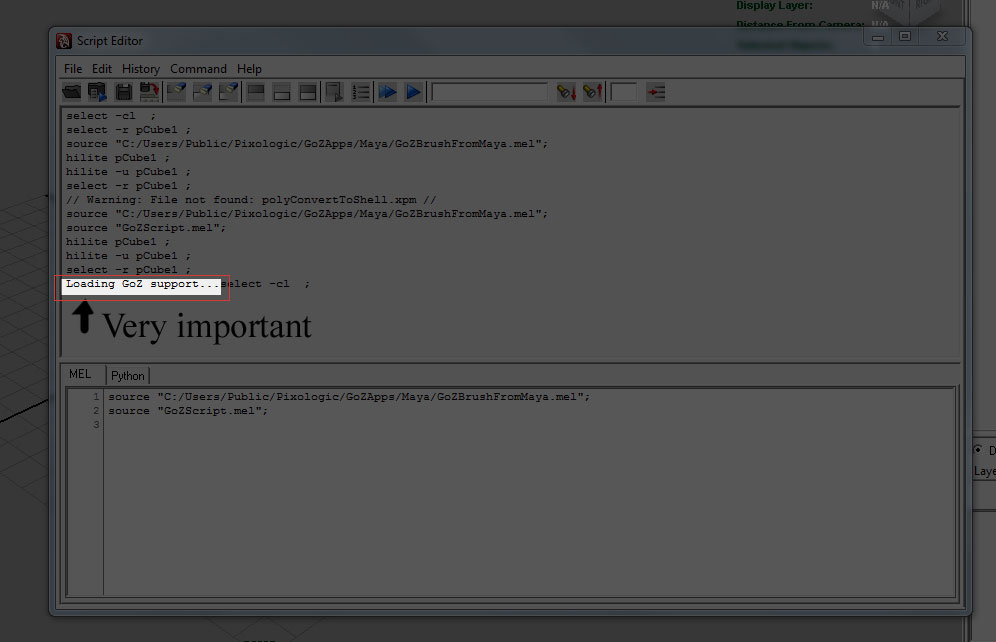
So therefore whenever you send back from Maya -> Zbrush, just open your Script editor and make sure it says there " Loading GoZ support…"
If it does, then everythign should run smoothly. I have attached an image to point to wat I meant.
Hope this helps. Have fun GoZing!
Yung, you have solved my problems completely. Thanks for the help.
G
Like allready said timhardman you can delete userSetup.mel file in your C:\Users\YourPCName\Documents\maya\2011-x64\scripts directory, OR (if you have some custom scripts or plugins) you can modify it by adding the following line in to it:
eval(“source “startup/GoZScript.mel””);
Thats worked for me. I’m on Win7x64.
Hi
I tried what was suggested but didn’t work
now not only do i get multiple instances of maya but no objects import/export!
when i GoZ its just a blank canvas so now really screwed!
edit:ignore the above, reinstalled so goz works again but still getting multiple instances of maya, don’t have the userSetup.mel in the maya folder, only have it in program files, made the correction over there and still same result…
I’m still waiting for feed back on this message. Am I the only one who see’s this from Maya?
Many thanks to yung!
So I’m getting multiple instances of Maya opening again now that I’ve upgraded to Maya 2012 with the new update of GoZ.
I’ve tried the method for fixing this for Maya 2011 and it doesn’t work.
Any suggestions?
Please, for your GoZ issues (and especially multiple instances of Maya), check and post in this thread: http://www.zbrushcentral.com/showthread.php?t=93841
Thanks!
Just thought I would post this as i wasted an hour or two on it.
Make sure you have
eval(“source “startup/GoZScript.mel””)
in your usersetup file, there may be more than one, one being in your prefs and the other being your Program files. I like to have just one in my pref, so i just removed the other one. /Two different usersetup’s may cause a conflict.
This is mentionned in the manual install pdf provided with GoZ
sorry, missed the other thread.