ZBrushCentral

GoZ and polygroups

Can anyone tell me if there is a way when using GoZ to go between Zbrush and Maya to keep my polygroups intact? Every time I bring the mesh back into Zbrush, I have to redo my polygroups. It also never seems to actually keep my higher resolution detail intact either when going back and forth. Is there any kind of trick or what?

Thanks!

Anyone?

I see videos of others sending meshes with high resolution detail in zbrush to maya, max and other apps via GoZ, adding new typology, removing edges, etc and then sending it back to Zbrush and everything appears to work just fine with all the higher resolution details in tact.

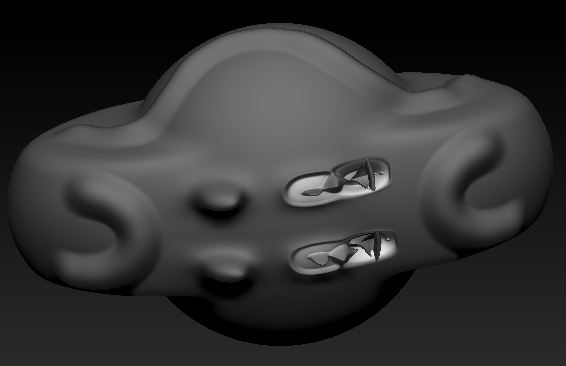
Whenever I do it, areas of my model always seem to explode. It doesn’t matter, if I delete one whole side of the object, add new geometry or whatever else, mirror the geometry back, then send it back to Zbrush or if I just extrude a couple of faces and then send it back. It always explodes.

Is there a trick or something that I am missing?

For the polygroups, yes you will lose them. A potential trick is to save your polygroups as a polypaint, then to a texture, and if needed, doing the opposite.

For the details, ZBrush ask you to reproject higher subdivision levels when importing back your mesh ?
If not, check that you don’t have several identical tools loaded in ZBrush. If you are doing operations which change the name in Maya and send your model back in ZBrush, GoZ will consider it as a new Tool and won’t update the original one.

Thanks for the reply Totyo! Yes it always pops up a dialog informing me the typology has changed and asks if I want to keep or discard the higher resolution detail. If I say no, it deletes the higher subdivisions and imports the updated mesh, but it normally imports at a larger scale and at a different y position. If I say yes, it imports the new mesh at the same x,y position but parts of the mesh always seem to explode.

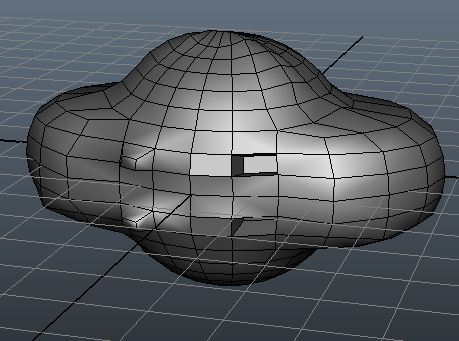
I've included a few images of what happens. This is just a simple example I created really quick. Subdivived mesh in Zbrush [http://www.zbrushcentral.com/attachment.php?attachmentid=243072&stc=1](http://www.zbrushcentral.com/attachment.php?attachmentid=243072&stc=1) GoZ to Maya 2011, deleted right outer extrusion things, filled hole and then extruded two different faces inward.

http://www.zbrushcentral.com/attachment.php?attachmentid=243073&stc=1

Back to ZBrush and reprojected higher when prompted [http://www.zbrushcentral.com/attachment.php?attachmentid=243075&stc=1](http://www.zbrushcentral.com/attachment.php?attachmentid=243075&stc=1) Any ideas? [](http://%3Cbr%20/%3E%0A%3Cbr%20/%3E%0A%3Cbr%20/%3E%0AAny%20ideas?%3Cbr%20/%3E)

Attachments

example_1.jpg

example_2.jpg

example_3.jpg

For your first problem, check the scale and offset settings in the Export palette down the Tool menu.

For the “explode” issue, it’s because your projection range is too high. Before briging back your model from Maya (or other package) to ZBrush, go in the SubTool palette, and change the Dist slider on the right of the Project All button to a value like 0.1 or lower and try again. It will solve this issue.

Thanks again Totyo! I’ll check the projection distance. As for the scale issue, it seems weird that if it is the scale and offset settings, that it only puts it in a different scale and position if I click No on the import/update resolution dialog window.

For this issue I have been dropping my model down to the lowest subdivision level and exporting this out as an OBJ.

Then I do my GoZ work, when I am ready to get my polygroups back I then drop my model to the lowest sub D level, store a morph target (to hold the current shape of my model.) then I import in my obj model with the polygroups. If my model has shifted around at all in the shape then I go back to my saved morph target and hit the switch button to get my model back into the correct shape.

It seems like some smart ZBrush people could automate this process.

Hope this helps!

Peace-NickZ. :wink: