I am doing this video tutorial, doing everything as i see the guy doing but i get different results/options.
- I create a cube, enter edit mode, then go to Unified sKin, lower resolution to 8 and smooth to that part is ok.
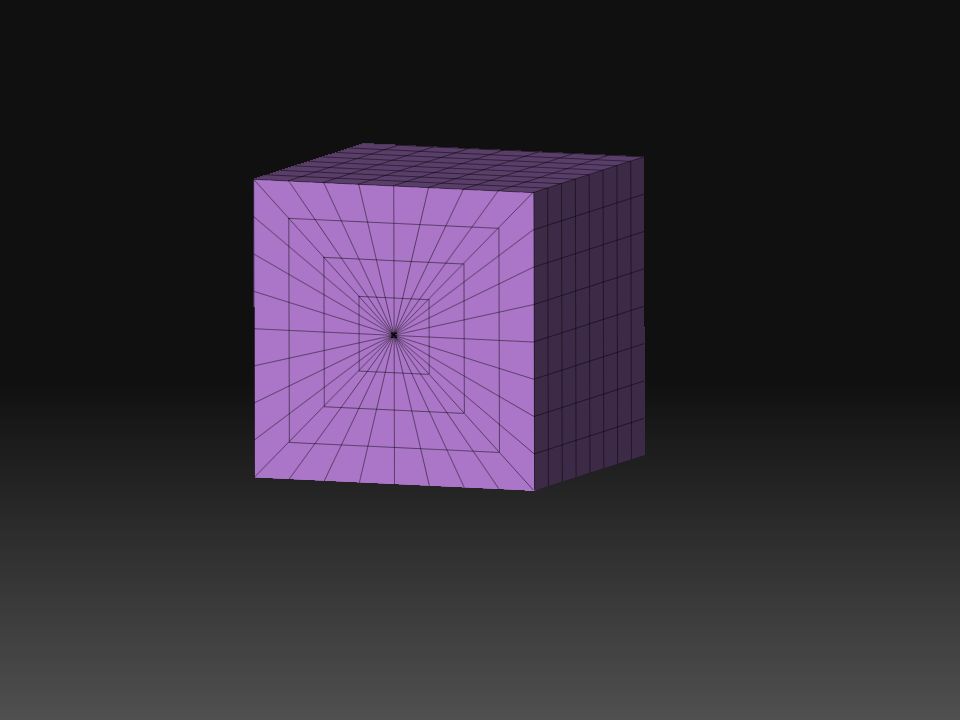
2)Then im suppoused to click ‘Frame’, and when i do, i get different results then the guy. the guy gets small squares all around the cube, like its in a wireframe mode, but what i get is normal squares on some sides, but different things on a few other sides, like some spider web, with a point ni the middle. why does that happen ?
3)then the guy goes texture/enableuv. I go texture, but there is no enable uv. So i clicked on ‘make polymesh3d’, and then go texture but uv is already enabled then, which is ok i guess.
4)then i should go to geometry, and im suppoused to go reconstruct subdiv three times, so that “wireframe” mode disappeares thats over the cube, but (i think its coz od the
spider webs’, it turns into some star-like object!
why the hell is hat happening ? why arent squares all over the cube in the first place ?
Please help me.
p.s.
ive included the picture of the messed up cube, that ‘spider web’ is the porlbme, its not suppoused to happen.
Attachments