i have something very funny going on , i am pressing go z , with model , and it shows me empty list of aplications , that i dont have (i got 3ds max 2011 ) so how to reset this goz option ?
i really need help with that i spended a lot of money to get that combo i need to make it work , i had zbrush first and i tried goz before , but because i had blender it obviously didnt work (now i know) after convincing begging and buying flowers to my wife, i got myself 3ds max ,when i go GO Z it still shows me all aplication GOZ capable in gray , like i dont have any , i reinstalled zbrush , on same machine , do i need to put fresh sytem ?
any help ?
Go to Preferences >> GoZ within ZBrush and click on “Update all Paths” to perform a new application search and full GoZ installation. Alternatively you can click on “Path to xxx application” and then navigate to the GoZ enabled application of your choice. During the application search and install procss, you may be prompted to choose the version that you whish to use. You might also be askd to manually browse or select the application file.
hth 
thank you etcher
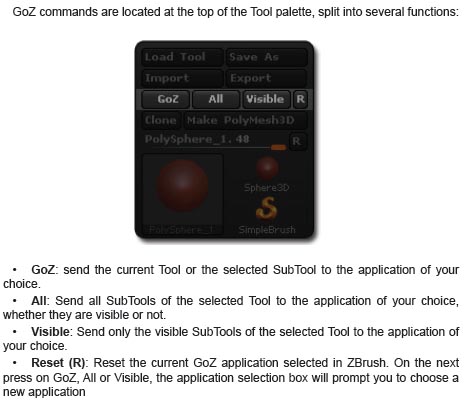
it works now detects and things ,how to transport model with multiple subtools, like 100+ , i love subtools , im addicted to subtools , and i want to build my models from subtools , i want subtools in my subtools (thats a bit to far)
but question is , how to transport all together to max at one go?
[attach=246848]goz.jpg[/attach]
there you go
Attachments
awesome , works, any idea , can i do it back, from max to zbrush same easy way ?