ZBrushCentral

Getting in that focused detail, not running out of geometry?

I’ve got a problem that has kind of been hindering me from “progressing in zbrush”

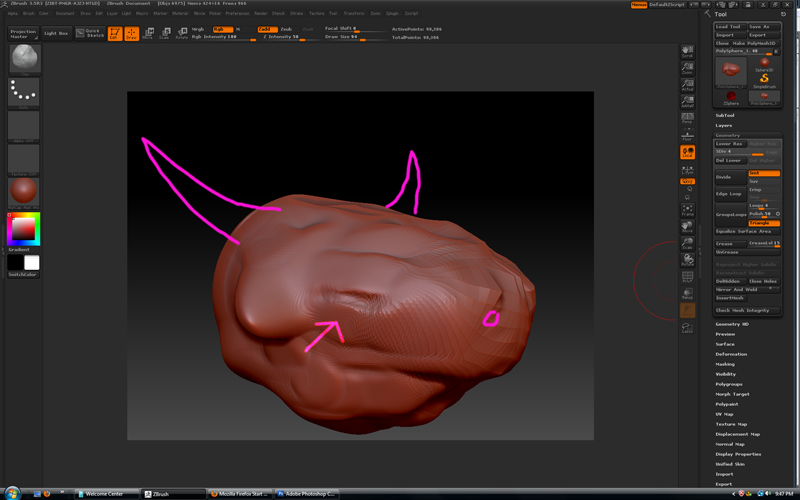
What im wondering is, what are some of the best ways to focus in detail, or get extra geometry to work with in finely detailed areas like ears or eyes. I dont want to have to subdivide my entire character into 20 billion polys just to get decent details in the face, and i know theres a better way but i dont know what it is.

Also i guess this would apply for other details too. If for example, i try to add something like a big badass demon horn to some dude who’se face is already modeled out, what is the best way to do that?
Right now i’ve been trying to use the move tool to stretch geometry off the mesh, then modeling that, but even then, when i start detailing stuff out, my mesh not surprisingly starts getting chunky and i run out of detail and have to subdivide my entire character to get a little more detail in the horn(most likely because of how im extruding stuff off of it).

So whats the best way to get that extra detail? i know it’s something super simple most likely, but that knowledge is just evading me. Even just directing me to a tutorial online or something would be really appreciated, i checked through a bunch of the videos in the tutorials section and have been watching them, but can’t find a clear answer for this. Thanks!

Attachments
Untitled-1442.jpg

Retopology is what you are looking for I think? Maybe one of the zpros can elaborate?

Retopo can be one way to get more geometry to localized areas and is typically the best way to ensure you’re getting all that you want out of the mesh…but is time consuming and requires a bit of technical skill (not really artist friendly) but you can pick it up pretty quickly and become competent in a fairly short period of time.

You can also perform local subdivisions.
Mask off the areas you don’t want to add geometry to. Go to your lowest SubD level with the mask on, and divide (tool>geometry>divide…ctrl+D) This will create an extra subD level in the single area that you want it to. The down side here is that you’ll end up with rather sloppy geometry (not a big deal if you’re going to retopo later though).

You can start to split meshes into subtools so you can subD up areas that require more geometry than others. This will create seams in your mesh though, so it’s best to break a mesh into pieces when you know you can hide the seam (a neck into a shirt, a hand to a watch, etc).

As to your horns question you’ll want to look into how Zspheres work (if you don’t know already) They are how you lay down clay (geometry) in Zbrush, so you can have each horn be it’s own mesh so you can subD up just that area, as well as add new pieces to your mesh (hair, necklaces, etc). If you’re on a PC and running 3.5 you can also use Zsketch and really create ANYTHING you can think of.

If you haven’t gone through the zclassroom tutorials yet I recommend the ones that are for beginners (“getting started” I think). They cover everything you need to get started in Zbrush and be dangerous. Each vid is typically 1-2min long and covers what you’ll need to know. Polypaint, Zspheres, navigation, brushes, trasforms, etc.

Hope this helps.

That totally helps. I think the local subdivisions then retopo is what i’ll try first. thanks very much!! I very much appreciate it.

Hey goast, those are some good points! I was wondering would Decimation master aid in gaining more geometry to work with? I haven’t mastered it yet, but my impression was you could take a really high poly mesh, decimate it and retain a lot of detail. Then retopo it and use ‘Project all’ to recreate the geometry at a lower SubD level? Not sure if this is a good method of doing things, just a thought I had :slight_smile:

T0rch - Decimation Master isn’t really used for that…though it could be I suppose. I personally use Decimation master to get a mesh that has the details I want in it and take that mesh into Modo to retopo and bake AO, Diffuse, etc, then into xNormal for baking of normals.

I also use Decimation Master to take a mesh I haven’t retopo’d yet into Modo for extra mesh creation…helmet, gloves, boots, etc. Mostly just for things that require a decent edge flow for an SDS mesh, as well as things that are just easier in a traditional modeler.

I’ve also used Decimation Master to crush a mesh down far enough for a 3D printer to be able to print it.

I don’t use project all that often as it can’t figure out how to properly project across multiple meshes, and you should also have a mostly non-tri mesh for zbrush to work best. Most of my game meshes have tri’s all over them. So trying to work on that mesh is a nightmare inside of Zbrush.

I would rather just sculpt my meshes, decimate them, LP them, and bake them.

Not have to sculpt them, LP them, project them, correct the projection, do my bakes. Just a personal preference I suppose.