ZBrushCentral

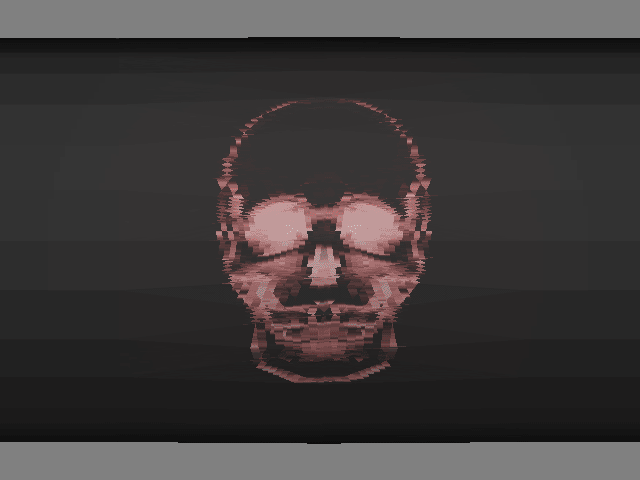
Fuzzy image after using projection master with stencil

Hello Everyone.

I have a problem that I can’t seem to figure out. I created a model from Rhino 3.0 and imported it to Zbrush. The model is around 5000 polygons. I divided the model into 900,000 polygons. I created a 4096 texture map and for UV’s, I used GUVTiles. I then imported an alpha and converted it into a stencil. I entered into projection master and colored the model using the stencil. I’m only using color. No deformation. The outcome that I want looks like the first picture. However, after projecting the image, it looks fuzzy and distorted. How do I fix this?
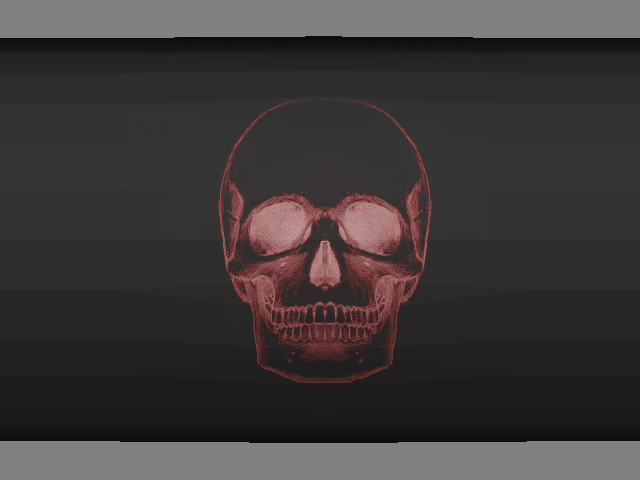
pic 1.gif
Thanks.

Attachments

pic 2.gif

did you…

a) create the 4096x4096 texture then create the guvtile uv’s or did you just go hit guv button without a texture? Guv tiles to work well need to be mapped in the texture size you plan to texture at. If you didn’t do that then the default size is 1024x1024 which could cause some funky stuff when using larger sizes for texture

or

b) map it by creating the right texture size texture first and clicked guvtiles next then go to pm and have a smaller size texture loaded by accident? Again if you don’t have a texture loaded when going into PM and click yes when it asks if you want to create one…it creates it at the default 1024x1024 size which as you can imagine trying to use a small texture size with a large mapped uv will create some funky distortion when it tries to figure out how to put all that info on a smaller texture.

some ideas to try in case it’s something simple…anything more…I am lost:D.

This tutorial should be just what you need.