ZBrushCentral

forming loops

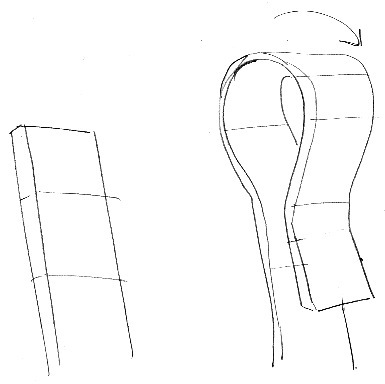
I’ve a flat piece of geometry that I want to use to create loops and straps on a character. I’ve used GoZ and bend deformers/lattice shapes in Maya for some of the larger curves, but I’m stumped on smaller, tight loops such as these…

Moving the vertices in maya wrecks the topology, and I don’t seem to be able to get any kind of fine control using move and rotate in zbrush…

?

Attachments
Scan-120421-0001.jpg

Transpose and the move brush would probably be the likely options in zbrush. In Maya you could create a new model so that you don’t have to worry about ruining the topology. Extruding it along a curve would probably be fast, and then just import and append it to your sculpt.

yeah I managed to get a reasonable result using the transpose ‘bone’ posing mode. I want to avoid making new models for everything as I’ve created the flat ‘strap’ with a nice constant thickness and a webbing texture (actual geometry not image) applied with the layer brush. I struggle with thin geometry as it is and I imagine I’d have terrible trouble trying to get the texture onto a thin, curved surface evenly.

I suppose it depends on your workflow. I like new objects as I can easily give them a new set of UVs, along with noisemaker for the surface texture. Then I start merging once the bulk of the work is done.

Backface automasking can be a life-saver with thin geo.

with something like a nylon strap it seems easier to me to UV and texture it first, then bend and twist that as needed.
as for noisemaker, I can’t get anything useful out of it at all… I’m not sure why I find it so confusing either :confused: