I imagine this has been mentioned before, but I did a search and didn’t find anything about it, so I apologize if this is redundant.
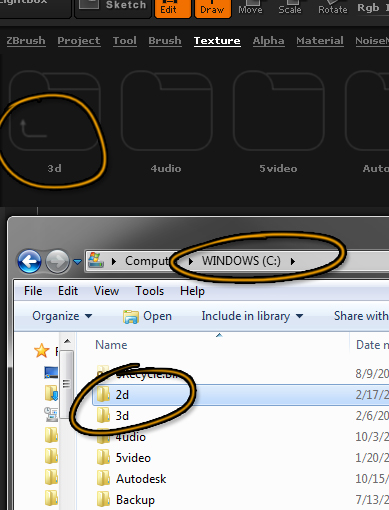
I keep my files organized into a few main folders from my root directory to make them easy to find. When I try to open files from them through Lightbox, here’s what’s happening:
That’s how Lightbox is showing C:*.*, with the first directory (\2d) missing and with \3d\ inaccessible, with an up arrow as though it were …\ (double clicking it refreshes it). I have a secondary hard drive that it also can’t get to.
It’s been doing this since whatever version Lightbox started in (3?), so I guess it’s normal. But what’s up with that? Is there a way I can make it recognize these folders?
Also, unrelatedly, every time I save a ztool, I lose pressure sensitivity (it sticks at 100%) until I switch to another window and back. And sometimes when lazymouse is on, it’ll run a long stroke of whatever I’m using straight across my model seemingly at random. For a while I thought maybe it was just my tablet or something, but I’ve seen it happen to other people too. I assume it’s a known issue, but is there any more info on what causes it or how to avoid it?
Thanks.
Attachments