ZBrushCentral

Flying mount, with flying verts

Hi guys,
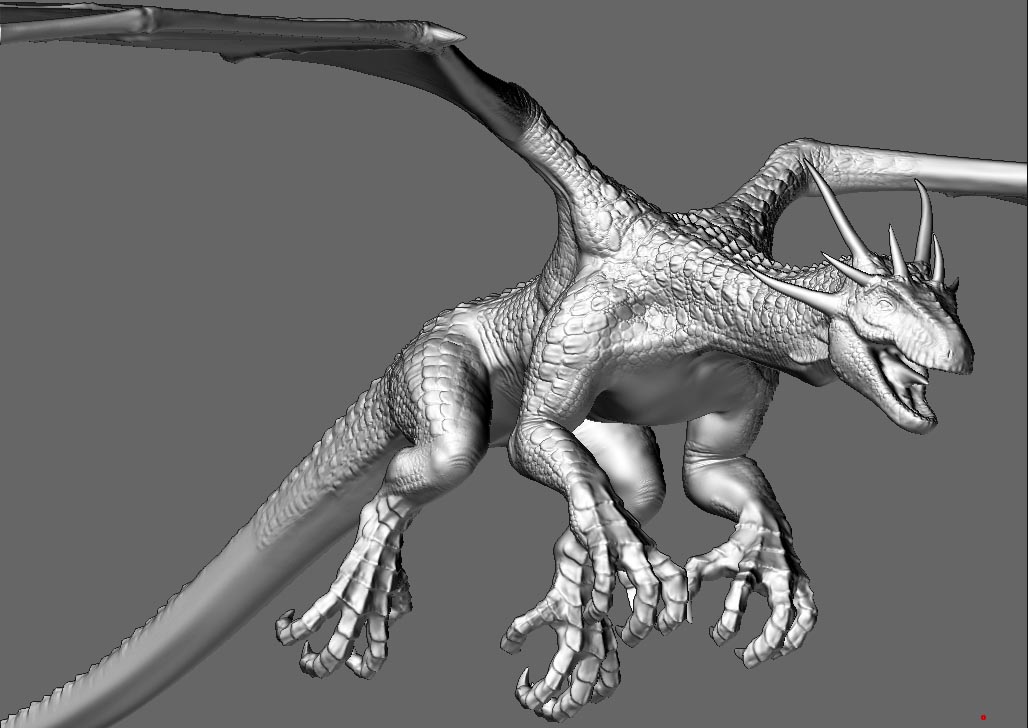
This is going to be an flying mount for a game engine.
During the modeling of it I came across a single vert that had moved a fair distance away from the main model.
I fixed it by using the move tool and massaging it back into the main mesh.
I did a quick normal map generation and couldn’t see any abnormalities (obviously didn’t look enough).

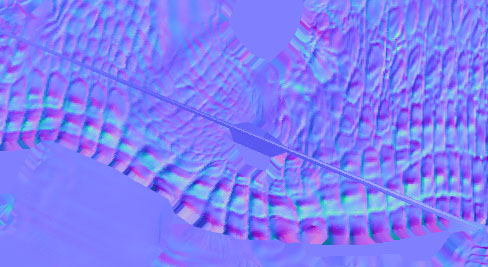
So I’m at the final stage (nearly) of modeling and I see this line in the normal map. It comes out of the exact same spot (foot) that the flying vert came from yet that area is nice and smooth in the mesh.

Does anyone know why this happens in the first place?
And, how to fix it without causing down stream problems?

Oh, and if you have any crits for the work, I would be pleased to hear them, especially suggestions for a colour scheme.

Attachments
dragon2.jpg

Heres the weird normal map streak.

Attachments

normal.jpg

This is normally caused by a point that lies right on the edge of a UV space. Such a point can be read as being on the opposite side of the UV space instead. Always put a buffer space around the edges of your UV spaces when laying them out.

I’m fairly certain it’s not a UV problem because;

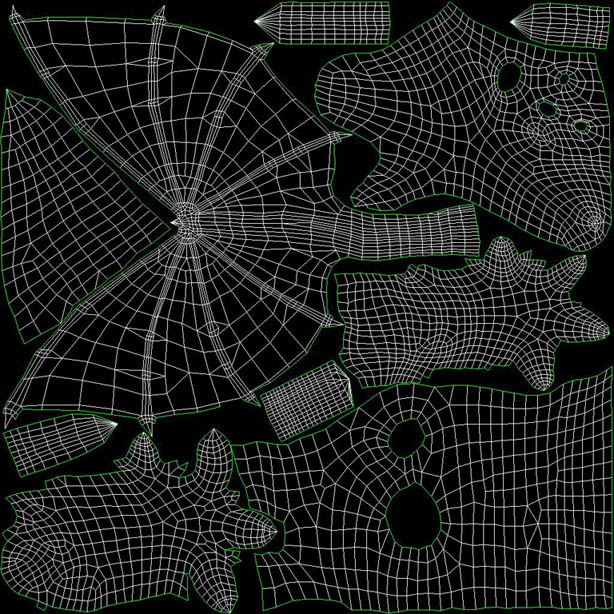
a) I layed out the UVs of the low poly model, see image attached.
None of the verts are outside the threshold (its a bit compressed but trust me). Next time I’ll bring them in a little more just in case your right.
Also, that particular part of the model (where the vert cam flying out and where the normal map streak is) is a good 10% of the way from the UV borders edge.

b) Why would the line originate from the exact same spot in the UV map that the vert came flying out from?

I was trying to think of a way to fix it.

Is there a way to remove part of the model for normal map calculations.
Could I mask/hide the section of the foot causing the problem and then generate the normal map.
If theres two overlapping UV’s it wont matter so much if the small section of the toenail is warped, but it will be a ruined asset if that streak runs along the side of the dragons body.

Attachments

uv.jpg

Load up your basemesh in your modeling App and get inside the model around the problem spot that had the stray vert. Check to make sure you don’t have a face cutting across the inner volume of your model.

This is probably not your problem, but i had the same issue with some verts shooting off into space when i subdivided, and upon investigating in maya i found that i had 4 faces crossing the inside volume of my shape, from having done an extrude with “keep faces together” off and welding on the outside, sealing the faces within the volume.

Anyway hope that helps, unfortunately if that is your problem you’ll have to fix the basemesh (changing the point count) and therefor have a hell of a time getting all the work you did transfered to the new mesh…

The model i had this issue on only had 3 division levels, so i actually manually made the new lvl 1/2/3 meshes match the old lvl 1/2/3 topolog in maya via point snapping… This was because doing a projection in zbrush was also reproducing the crazy triangles.

Anyway wow thats a lot of typing for something that likely won’t end up being your problem. But just in case, thought I’d mention it

Thanks for the replies.
I’ll load up the base mesh again, but I was pretty thorough with it. I did an STL modifier check which came up with 0 errors.
I get the feeling something got screwed up within Zbrush when that vert went flying.
It would be great to know what caused that issue.
I have a series of saves, if I get the time I might find where it occurred.
I guess I’m just going to have to modify my work flow to include incremental saves and normal map generation along the way just to watch out for this kind of thing.

Dude absolutely have incremetal saves!! You never know what crazy thing Zbrush will do next, and having incremental saves has saved me from 3 seprate bug attacks on the model i mentioned above.

Reloading old geometry, creative use of morph targets/ morph brush, and also reprojection have been great for salvaging ‘corrupted’ work. Albeit time consuming sidetracks…