Hi! Is there an option to flip the Z-axis when exporting a mesh from Zbrush using GoZ? I tried to change the ‘Import/export’ settings in ‘Preferences’, but it didn’t help?
// Tennet
Hi! Is there an option to flip the Z-axis when exporting a mesh from Zbrush using GoZ? I tried to change the ‘Import/export’ settings in ‘Preferences’, but it didn’t help?
// Tennet
GoZ is using predefined axis flips, then changing the preferences won’t change.
Do you have flipped issues in a target application? if yes, can you tell me more?
I was using the ‘SuperAverageMan’ (see attached) and when I send him to Cinema 4D (using GoZ) then he is “flipped” with his face pointing away along the Z-axis. I would like him to face the camera at import instead… In this case it seems that the ‘SuperAveMan’-axis is already rotated this way, because sending him back and forth between the apps (using GoZ) keeps the axis direction intact. So I guess there is no problem anymore, except that the SuperAveMan-axis is pointing the wrong way… 
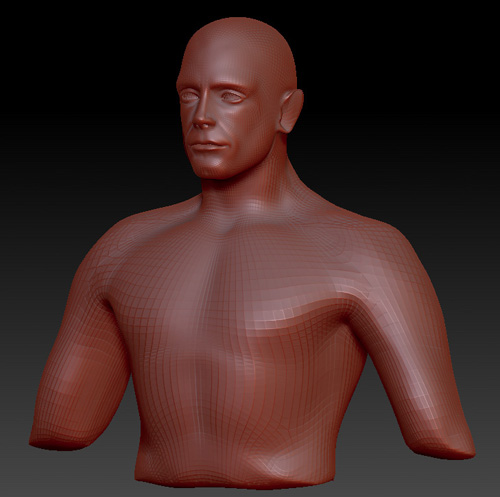
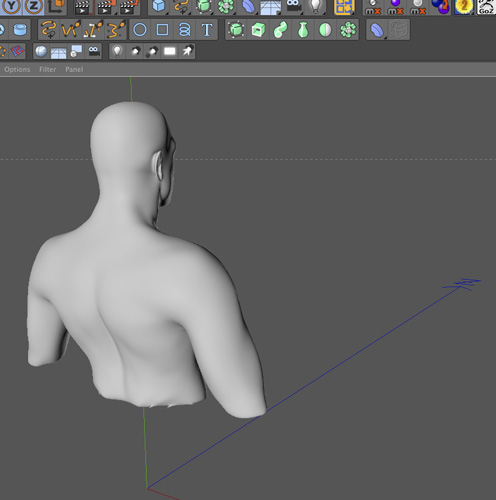
Some of my coworkers you Cinema and we are having the same issue with all files. It always flips the axis when go z is used, and this has only been an issue since R2. Haven’t heard back yet from Pixologic if there is a work around or fix, but if some here learns of a solution, please let me know. We are still using 4 as a result and not able to take advantage of the new tools because GoZ is a huge part of our workflow. Thanks 