ZBrushCentral

[Fixed] Noisemaker save button off screen

For some reason the save and load button of the noisemaker window are off screen. My resolution is 1366x768 which is the max screen res for my monitor. If anyone could help it’d be greatly appreciated.

Solution: “Having the Noise (or Edit) buttons close to the top of the ZBrush UI will also mean that theNoiseMaker window opens with the top visible.”

Attachments
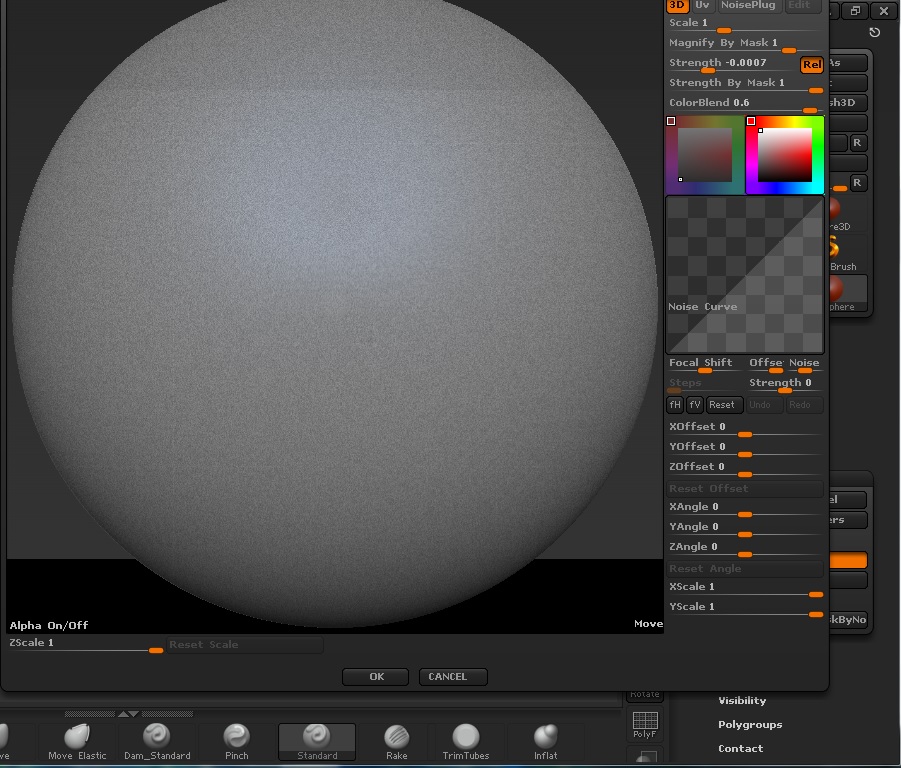
offscreen.jpg

You can try this but i´m not sure if thi will work in your resolution:
Assing a Hotkey to your Noise Button (Ctrl+Alt+Click, then assign the hotkey)
When you press your new hotkey make sure you have your mouse in a lower position…
Hope this helps

Great idea so I gave it a try, unfortunately, even if I’m all the way at the bottom of the screen it still pops up slightly off screen. I couldn’t change my resolution natively, but I was able to make a custom screenres of 1430x800 using the nvidia configurationscreen. This is obviously a workaround and not a fix, but I guess it’ll serve for now. It seems like Zbrush isn’t really detecting my resolution anymore, because I know for a fact that this is a fairly new thing, because I’ve used it before, I just haven’t noticed until now.

I just ran a Zscript called GetScreenResolution and it says: “Your screen resolution is currently set to 1362x784”. This should be 1366x768. It seems that when I try to maximize the window it doesn’t actually fully maximize, it just says “restore” and fills the screen but still allows me to drag the borders to resize. I’ve been trying to find a way to set the startup resolution but can’t find anything.

usually the startup resolution is stored when you press store config. So if you have your window in another position it will store that position and size.

http://www.zbrushcentral.com/showthread.php?181659-Noise-Maker-unable-to-view-the-the-whole-palette&highlight=Noisemaker+screen There may also be a file you could try deleting. Not sure which one.

Alright, so I was able to fix the non maximized window by deleting ZBrushWindowStartupSize.cfg. And then in the thread kindly linked by Doug Jones there was this line: “Having the Noise (or Edit) buttons close to the top of the ZBrush UI will also mean that the NoiseMaker window opens with the top visible.” And sure enough, it works. You can’t see the bottom buttons then but you can just press ‘esc’ or ‘enter’. Thanks for the help!