ZBrushCentral

First steps in zbrush 4R2

Hi everybody,
i am new to zbrush and i’m following a tutorial but i’ve got this kind of trouble:
it says to make a particular polygon startin with a 3d cube.
So i go to unified skin,put res to 8 and snt to 0(i don’t know what they are) and after unified skin.
Then i go to texture and mark enable uv(in this case i don’t have this feature(i’ve got zb 4and the tutorial program should be erlier and i think this uv in already enabled)).
Then i go to geometry,i push reconstruct sub,del higher and divide.Now the polygon is created.
The point is that i can do it on zbrush 4(even i don’t have enable uv)but i can’t do it with zbrush 4r2 because in this version i can’t go to 8 res in unified skin but only to 16 and also because functions that is needed in geometry menu are not avaible.
Can anyone give me a help?Here is the link to the video tutorial:

http://www.3dtotal.com/team/Tutorials_3/zbrush_training/lesson_01/zbrush_lesson_01_b.asp

Thanks.Bye!
In Lightbox > Tool, select the PolySphere.ZTL, draw it on the canvas and enable ‘Edit’ mode. Go to Tool > Geometry and switch to the lowest SDiv level. In Tool > Geometry, click ‘Reconstruct Subdiv’ button until you get what you want. Going to the lowest Reconstruct Subdiv will give you a 6 sided cube.

That tutorial is now slightly outdated.

Those are some weird looking steps you’re taking. Are you trying to make the Squirkle? If so you shouldn’t have to touch UVs, or Unified Skins.

Select the Default Cube project.
Step down to the lowest subdivision level, and reconstruct twice to leave you with the most basic cube possible (6 faces total).
Tools: Geometry: Del Higher
Divide the mesh once (smt on to smooth it).

Squirkle

Edit: Sorry for being too slow on my post and or sharing an alternative technique. It’s apparently offensive to some members… :rolleyes:

zeber2,Cryrid thanks.
zeber2 i 've followed your advice but i can’t understand why it works only with sphere taken from lightbox and not from the tool menu.Anyway can you tell me about any good updated tutorial?thanks.Bye!

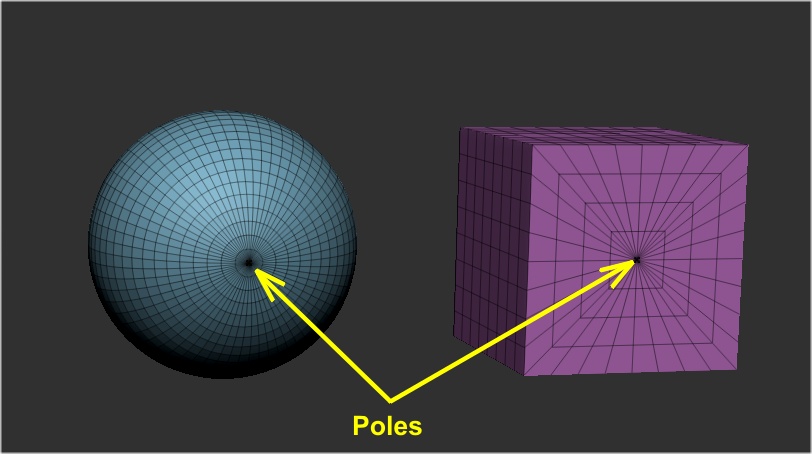
It doesn’t work with the Sphere3D because it contains poles (see image below) and the sphere in Lightbox was created from a six sided cube without poles. The Cube3D in the Tool palette also has poles and that is why you can’t reconstruct it down to 6 sides (6 polygons). As far as the tutorials go, the basics are still the same in the older ones, but keep in mind that ZBrush is always changing and improving so try to find tutorials that are made for the version of ZBrush you are using. You can still learn a lot from the older tutorials though.

poles.JPG

ok !