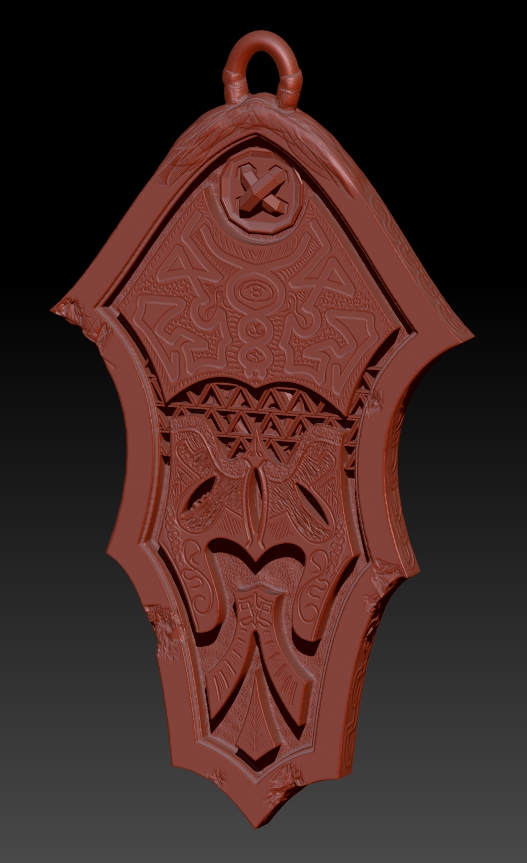
I hate to qualify this post but think I must because I’m a little embarrassed even posting this considering the ridiculous amount of talent and skill in this place. Right now I’m just learning zBrush, just learning jewelry making, just learning how to draw, just learning how to sculpt (digitally or otherwise) and am altogether a complete newb to this but, I am totally excited about the potential of using zBrush for making jewelry.
That said, I do have some background in woodworking including CNC routing so I can meander around Rhino to build basic geometry, which is what I did for this model. Basically, I created the plain pendant body and then imported into zBrush.
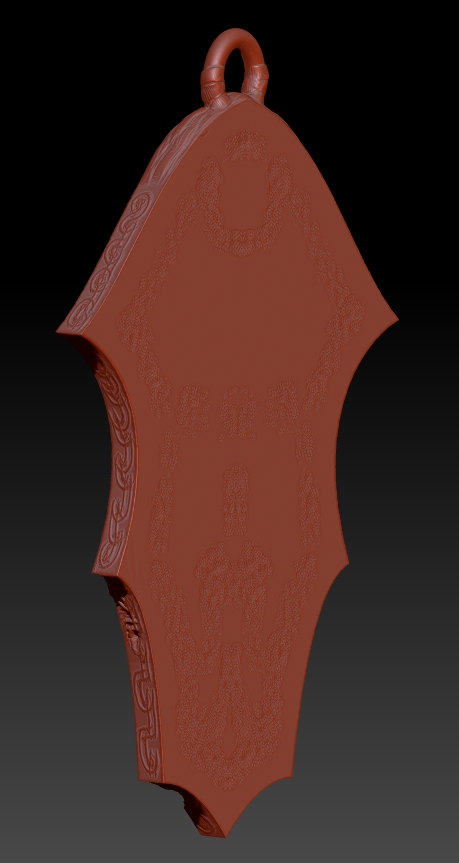
I’m pretty sure I did some things wrong along the way because the edges aren’t really sharp, etc. so if you have any advice along the lines of how to best import and keep things clean it would be appreciated (I did do a number of searches on the topic) but the main question I have is around the back of the pendant. I need to keep it perfectly flat so I can lay the model flat on the build table for 3D printing, plus, even if I stood it up, the back would look terrible.
The distortion on the back occurred when I textured the recesses areas on the front. I attempted to fix it a number of ways both using flattening, polishing and trying to build up the surface some but clearly have no idea what I’m doing.
Within zBrush, how could I fix this issue?
Thanks in advance!
P.S. There are a few anachronisms in the design if you look closely. I had no idea where I was going with it initially so please don’t look closely. 
Attachments