ZBrushCentral

Fan Art: 3D Printed Doctor Who Cyberman Helmet

Very well done!
All of them. Helmet, print & kid for sure :wink:
Thanks for presenting this detailed workflow.

Btw. If you wanna go crazy in sanding, look for ā€œmicro meshā€ (no joke :D) pads. These are between polishing wax and sanding going up to 12000! Awesome. Use it here for even polishing clear parts.

…Tutorial! :sunglasses:

Jim Carrey wants one! :smiley:

This is great! only tried small 3D prints but this has inspired me to try something bigger would love to do a helmet thanks for the tutorial :slight_smile:

Thank you!

Powerful tutorial 100% useful.

Congratulations.

I need one!

@natxxxo, @Frenchy Pilou: Thanks for the kind words!
@Fonty: I will be doing image breakdowns of the process :slight_smile:
@spaceboy412, @Knacki: 2k was the max I used on the helmet; I’ll have to check out the 12k micro mesh pads! thanks for the recommendation
@Gedn: yup the wax was just for a final polish; it also adds a little bit of depth. On small stuff it would be a pain to buff out however
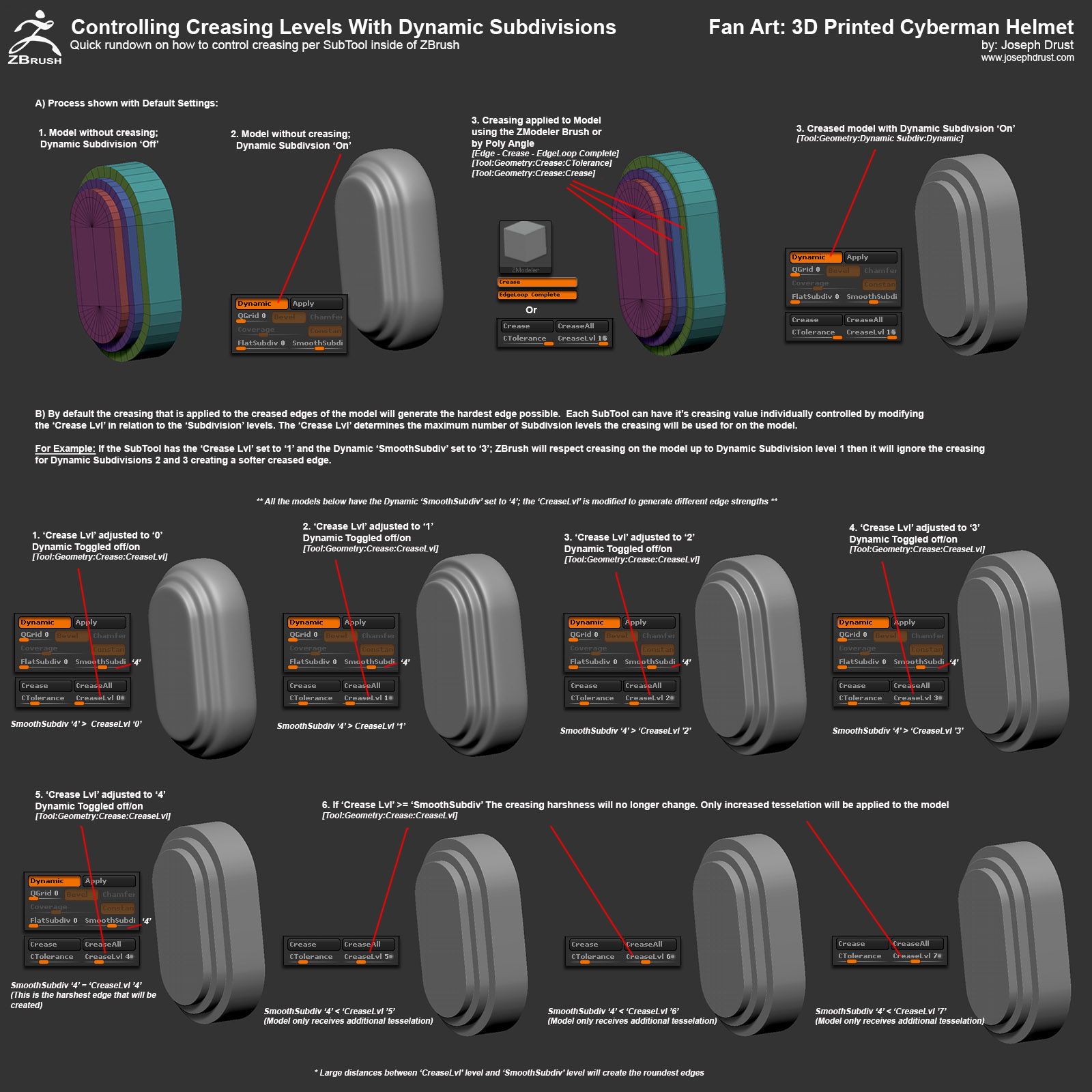
@DGralnik: I’ll make a quick image break down on Creasing
@JS_Morgan: Glad to hear it! I recently have been doing more and more larger mostly PLA prints; Printing Material cost for one helmet was ~$30.
@Intervain: =)

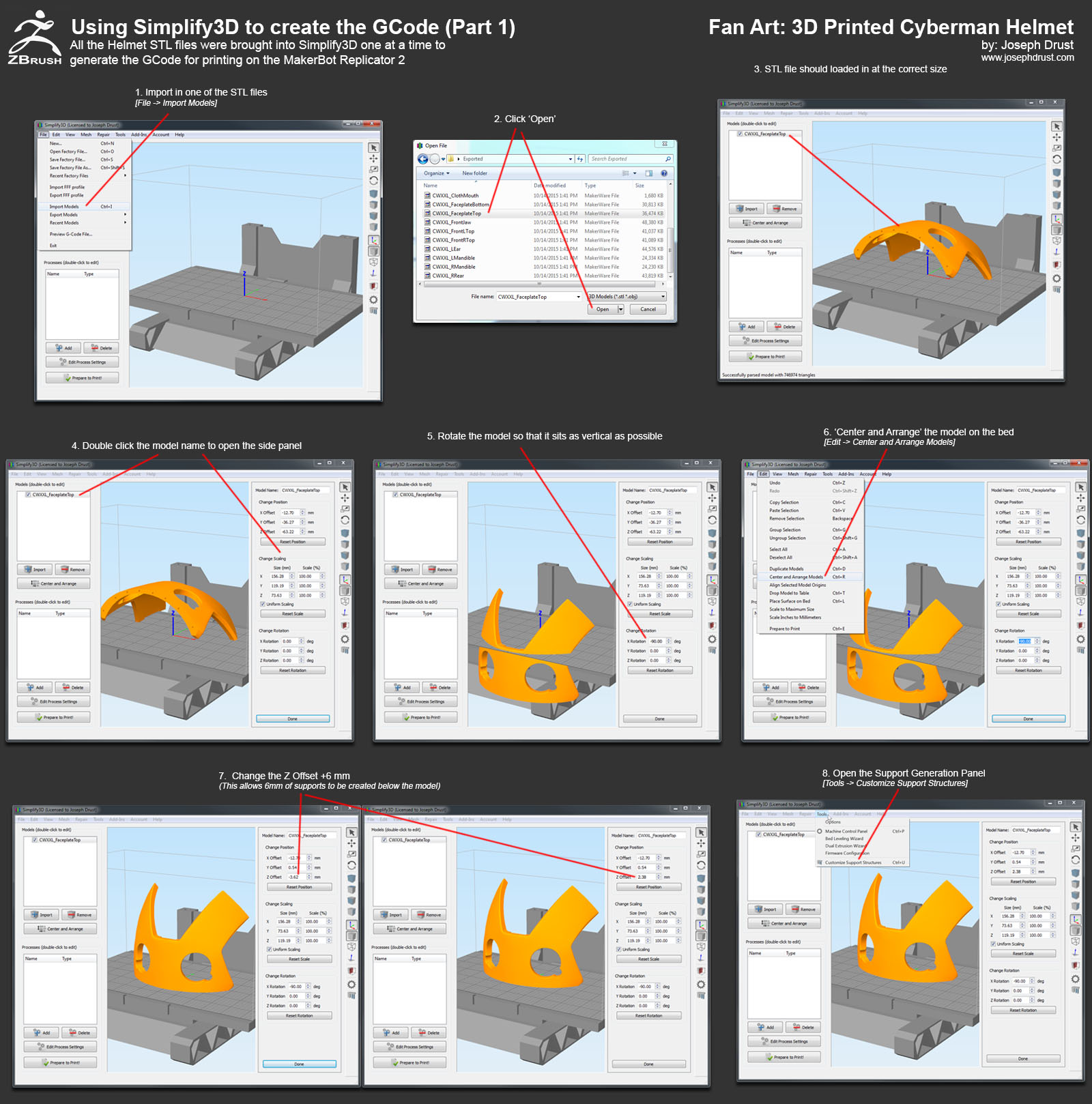
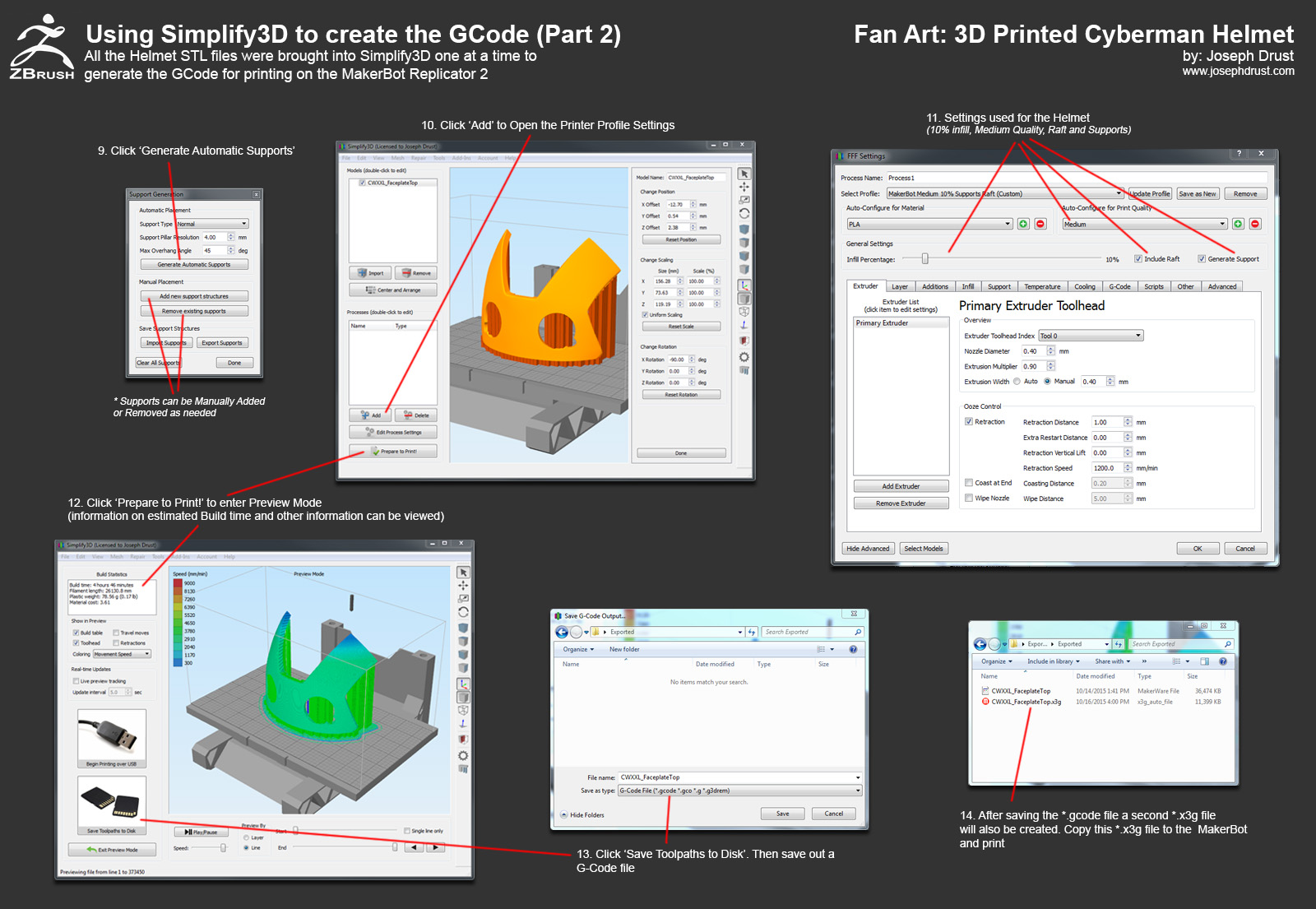
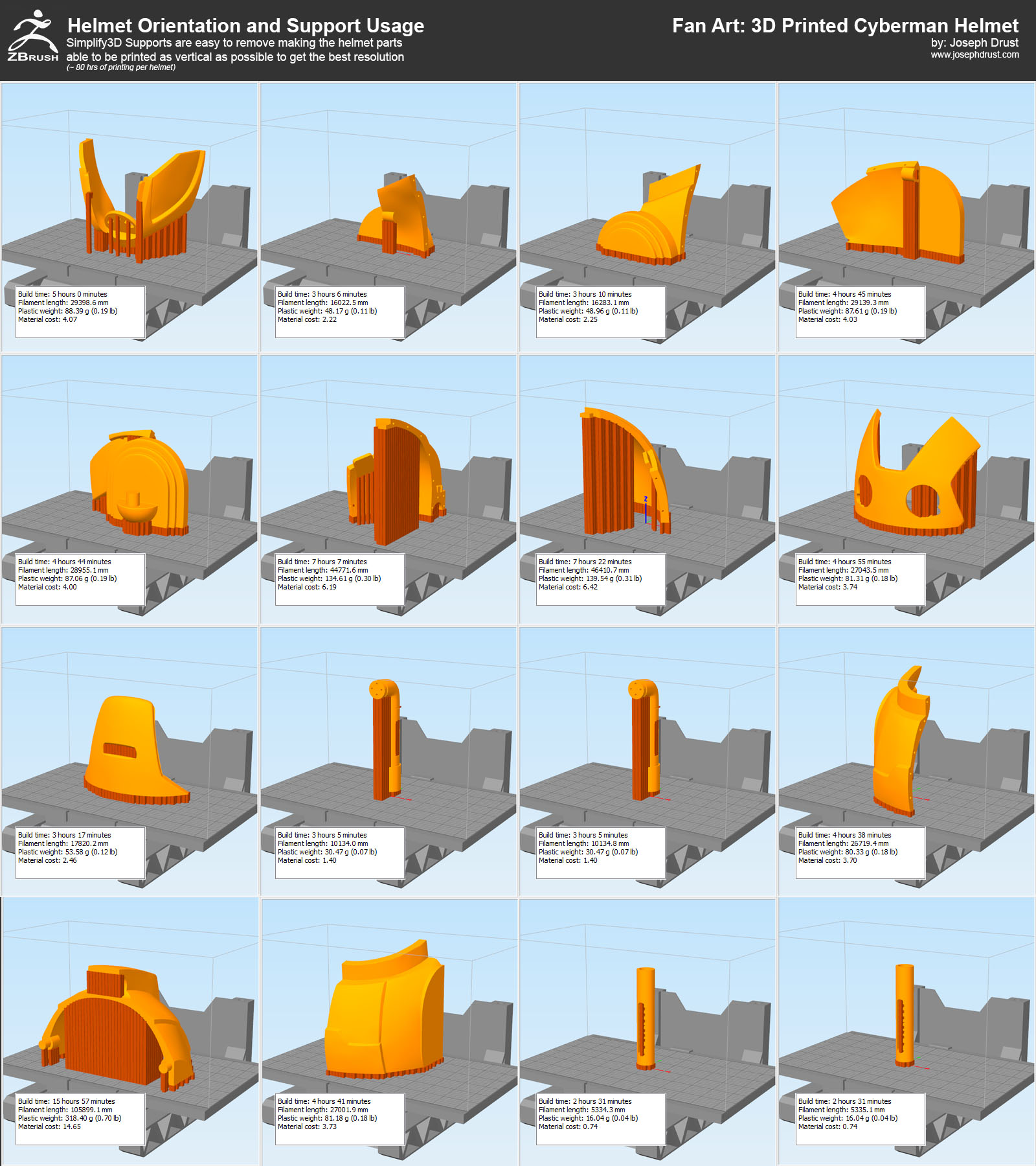
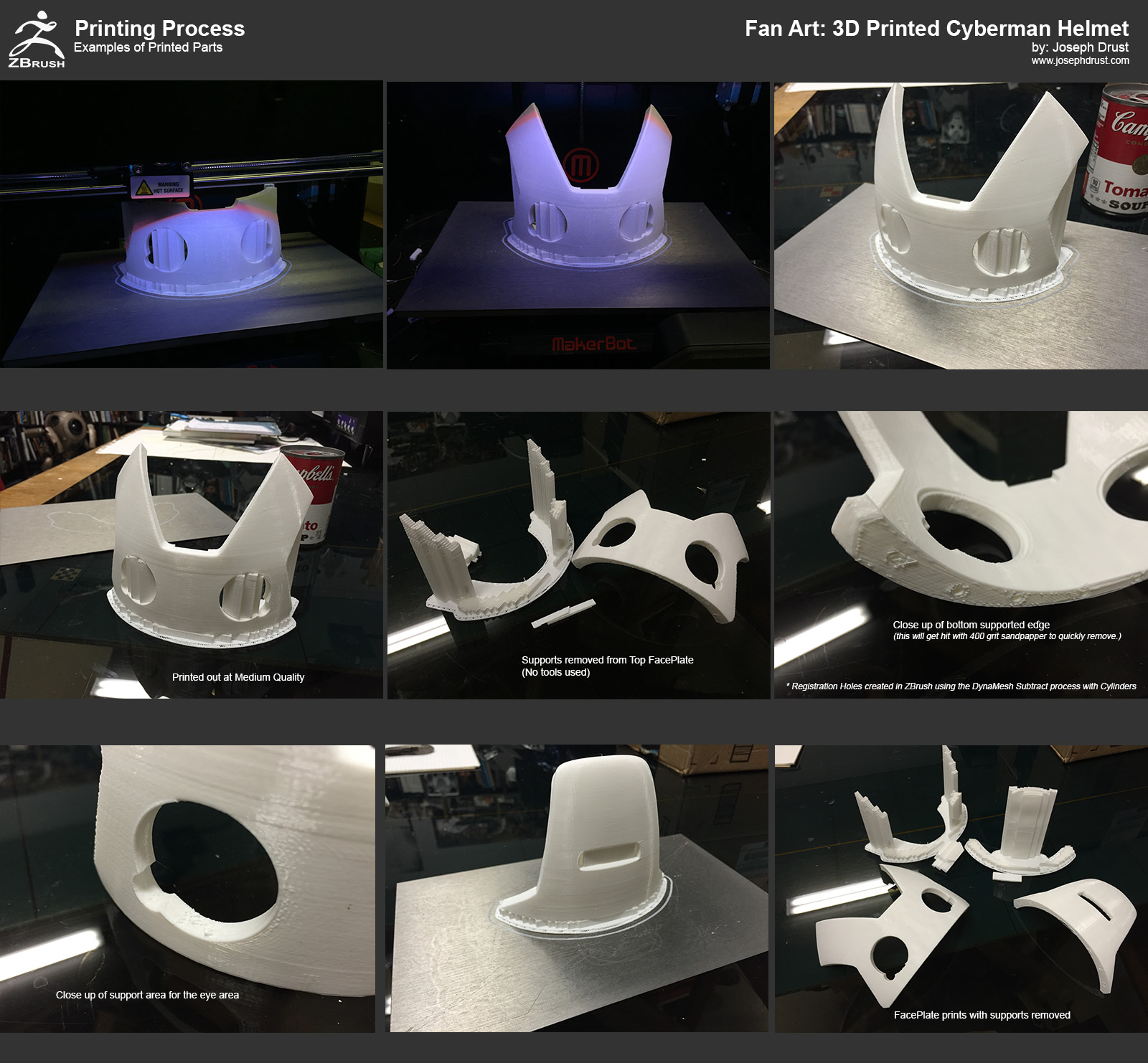
Here’s a few more tutorial images on the steps I used to create the GCode from the STL files that were exported from ZBrush. Instead of using the Makerbot Desktop Application I used a program called Simplify3D to create the GCode. If you have never used Simplify3D I highly recommend it; the supports it creates are amazing (they detach from the model in one pull without the use of any tools 90% of the time.) I will be posting more images showing the supports it creates.

Hope these help!

CybermanHelmet_Simplify3D1.jpg

CybermanHelmet_Simplify3D2.jpg

CybermanHelmet_Orientation.jpg

-Joseph

Attachments

CybermanHelmet_Simplify3D2.jpg

CybermanHelmet_Orientation.jpg

CybermanHelmet_Simplify3D1.jpg

1 Like

Good work mate, this is really inspiring.

This information is great! Thanks sooooo much for doing this.

wow~~~ COOL Helmet COOL Tutorial :+1:

thanks for the great tutorial

@Freewaldo, @Donghua, @Cosmick: Thanks!

@Monstermaker: Thank you for taking the time to post your workflows as well! I think fondly on the soldering iron approach pretty much every time I 3D print something :slight_smile:

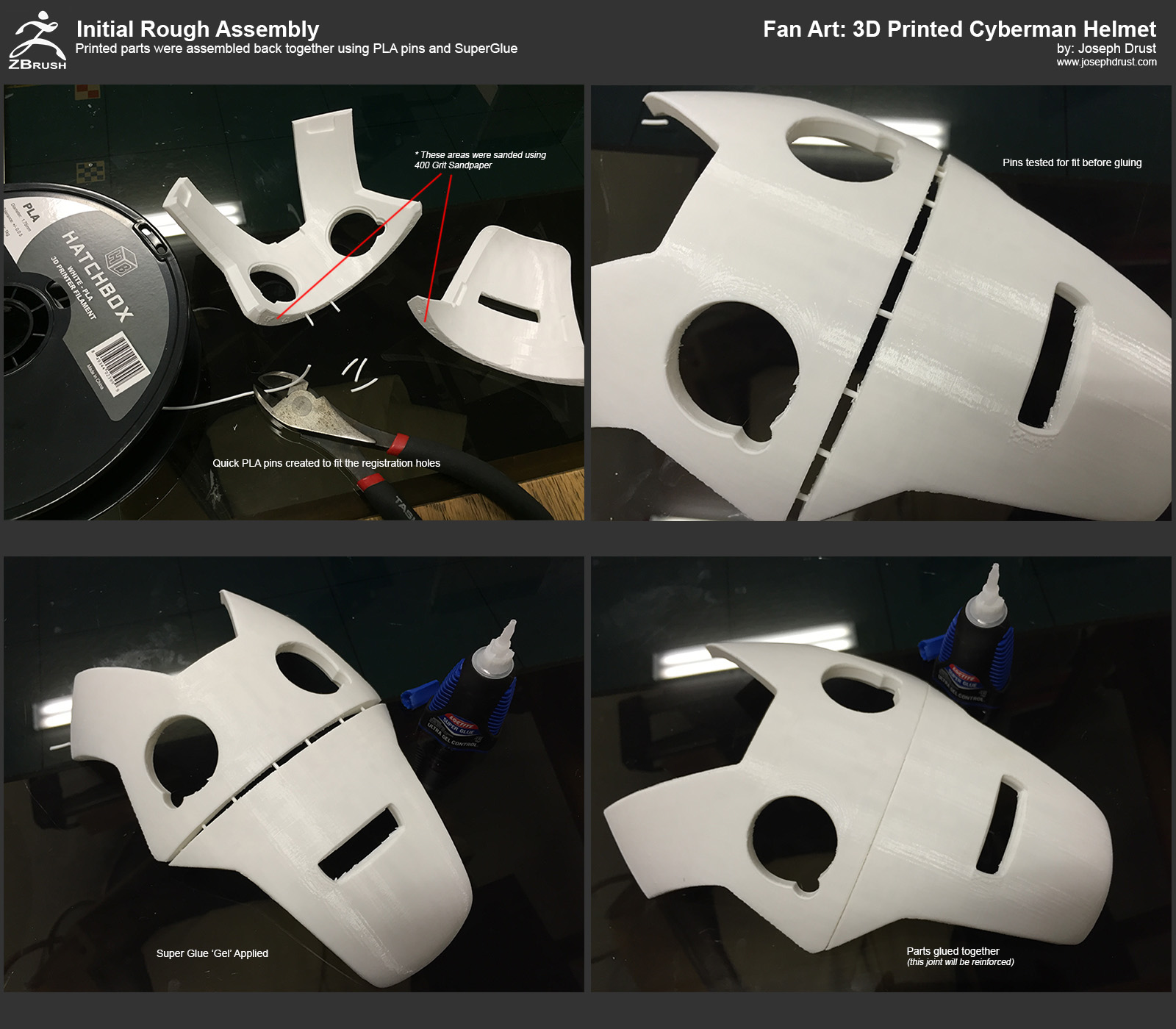
Here is my setup for my MakerBot Replicator 2. I am using a GeckoTek Build plate with the Magnetic attachment system. The Magnetic system is really nice and allows me to pull the build plate off easily to detach the prints. I run two GeckoTek plates that I switch between (I can fast swap the completed print and plate and slap in a new plate and print instantly.) The prints also adhere well to the GeckoTek plates; the plates do have a lifespan but I have printed ~60 prints off of a single plate.)
http://www.geckotek3d.com/

In general for getting high quality prints from the Replicator 2 I recommend four things:

  1. A precisely leveled bed
  2. Simplify3D Software
  3. Print as vertical as possible (Z Axis delivers the highest quality on the Replicator 2)
  4. Use Filament with a consistent diameter

For leveling I use a 0.10 metal feeler gauge to start the process (This is superior to the Makerbot business card :wink: ) After rough leveling with this I then use a Digital Dial Indicator with a Printed Snap-On Dial Holder using Henry Thomas’ Leveling script. You can grab the script and holder off of Thingaverse here:
http://www.thingiverse.com/thing:41090

After leveling once you can print for quite a while without re-leveling. I usually recheck the leveling monthly or if I start noticing issues in my prints.

For filament I am currently using HatchBox’s 1KG PLA spools. I have gone through quite a few spools of the material and have had no issues in it’s quality. The cost is really reasonable at ~$23 for 1KG from Amazon (it also ships with Amazon Prime if you are subscribed to that service.) Since I will be painting everything I print I usually just go with the cheapest color available.)
http://amzn.to/1MzK3bj

If you ever hear ā€˜click click click’ when printing check the filament; I have had quite a few bad spools where the diameter has deviated greatly. I have not heard any ā€˜click click click’ since I switched to the HatchBox PLA.)

I use a Low Temp Hotglue gun to assist if something goes terribly wrong (Hot Glue Works really well at adhering prints to the bed or strengthening small areas. I used this a lot more before acquiring Simplify3D.) While using this approach I always refer to Rick Baker’s thread on ZBC where he describes using a soldering iron to manually fix 3D printing errors :slight_smile:
http://www.zbrushcentral.com/showthread.php?177581-Bringing-back-an-old-friend&p=1068625&viewfull=1#post1068625

For removing supports I have two dental tools I primarily use. Most of the time these are not needed with Simplify3D (unless I just need to get a purchase on a small support somewhere to pop out.)
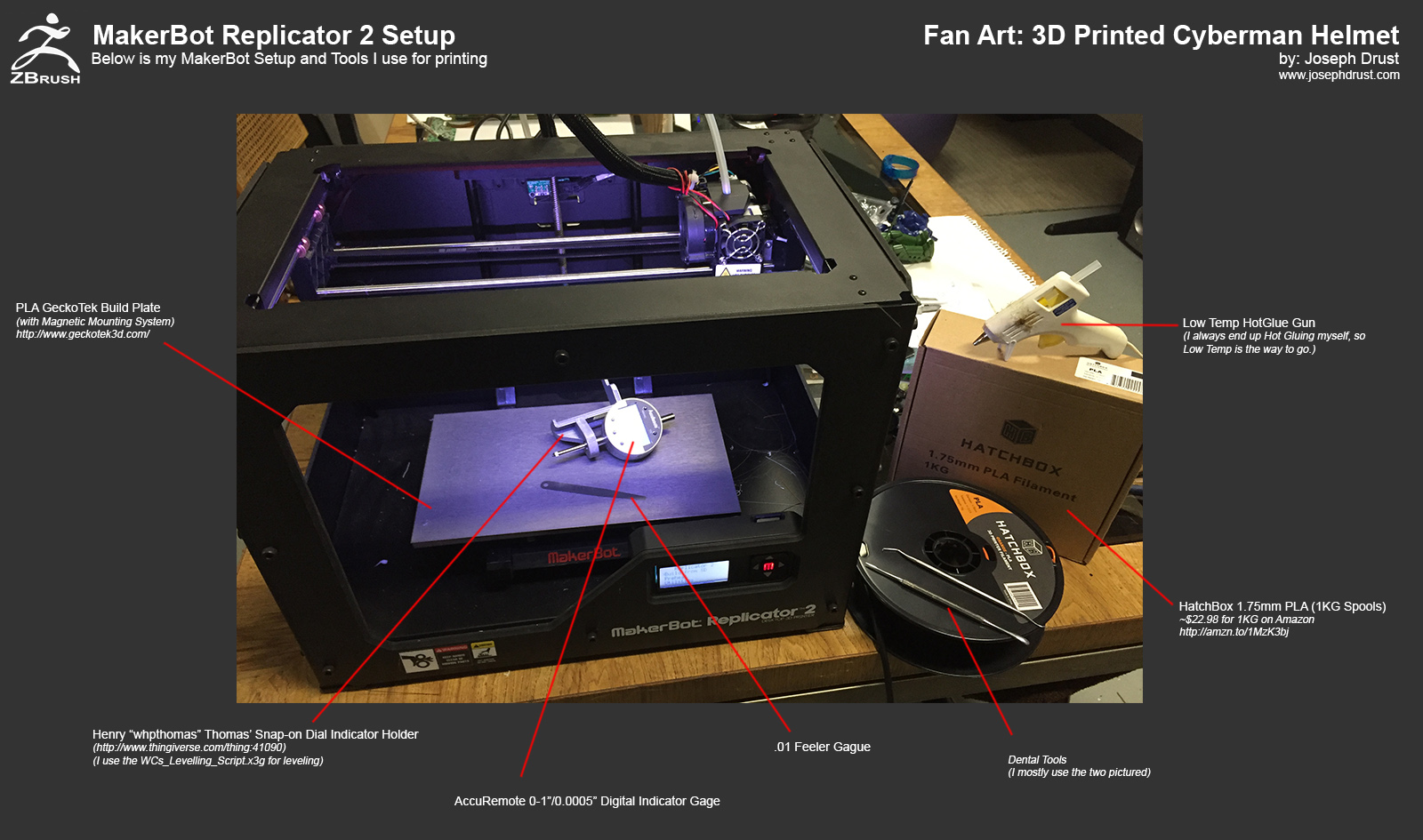
CybermanHelmet_MakerBotSetup.jpg

CybermanHelmet_PrintExample.jpg

CybermanHelmet_InitialAssembly.jpg

ā€œUse the Soldering Iron, Lukeā€

-Joseph

Attachments

CybermanHelmet_MakerBotSetup.jpg

CybermanHelmet_InitialAssembly.jpg

CybermanHelmet_PrintExample.jpg

1 Like

@DGralnik: Here’s one on creasing for you :slight_smile:

CybermanHelmet_Creasing.jpg

-Joseph

Attachments

CybermanHelmet_Creasing.jpg

1 Like

Awesome stuff my friend! Amazing write up as well!!! Keep them coming! What a cool project!

Thank you so much for the quick turnaround on the creasing breakdown. Can’t wait to give it a whirl!

Do you find that you used the QGrid slider very often? I’m finding that it’s a bit tricky to get a cube to have nice bevels without the whole thing turning a bit spherical. I give the QGrid slider a little nudge, and the whole thing shapes up pretty nicely.

These are very great information and breakdown mate! Love how its created with zbrush especially hard surface. Cool!! :+1:


Blog - http://amazingbeggars.wordpress.com/
Generalist Reel - https://vimeo.com/142727946
ZbrushThread - http://bit.ly/1Km8XqR

@glaucolonghi: Thanks man! I am getting closer to the end of the Tutorial Images; working on the final Traditional Processes now :slight_smile:
@DGralnik: I use QGrid quite a bit; I attached another image for ya :slight_smile:
@lt_ken84: Thanks!

Here are some more images of the printed versions of the helmets. I did create quite a few smaller test prints before committing to the larger ones. The test versions took an hour or so to print and I could check how the models would look in real-life. I went through about 5 test revisions before reaching the final shape of the helmet. Seeing the actual models in real-life and under different lighting conditions is huge. I also test painted the smaller versions as well (since perception of the object also changes after being painted with reflective paint.)

Also here is another image on Dynamic Subdivsions and when I use QGrid, Creasing, or Edge Bumping. In general I mix and match the processes where I see fit. I end up using all options in various areas on the model.

-Joseph

Attachments

Joseph,

This couldn’t come at a better time. What a great tutorial! I am in the middle of splitting up a model for printing and this is really helpful. I recall you raving about simplify3d when I spoke to you at the zbrush conference. Does simplify 3d offer tools to split the model? I have been searching for the best method, I have used Net fabb, Meshmixer, C4d and zbrush, but haven’t decided which work flow is most beneficial. I assume that you feel it is best to do it in zbrush, can you speak to the pros and cons of doing it in zbrush vs. other programs?
Also it looks like you would recommend splitting everything up and then decimating each piece individually. Does this pose any problems with the flat faces maintaining a sharp flat edge to match the adjoining piece?

Thanks
Q

@Quade: Simplify3D does not have any tools to split up the model; It’s basically just a bridge from the exported *.STLs to the printer (setting up supports, generating the GCode, positioning the parts on the bed.) I mostly do the splitting of the model inside of ZBrush because the models usually contain millions of polygons and most other programs do not handle dense meshes well. You could decimate everything before splitting and use netfabb. Netfabb does a nice job splitting but costs over $2,000 for the commercial version (currently well out of my price range; I’d buy another printer before that :wink: ) I just use Netfabb basic to double check the scale of exported files.

For decimating the model the process should keep the edges flat if they are flat (The process holds sculpting details and removes the tessellation.) I find that the actual 3D Printing process (% or error during printing) causes more problems maintaining the flat edges then anything else :slight_smile: With this in mind I try to keep everything in DynaMesh mode as much as possible then decimate finished parts as I work to keep my global polycount low.

Hope that helps!

-Joseph

Thanks for the pro-con breakdown! Definitely above and beyond what I was expecting and really helped solidify the concepts for me.