ZBrushCentral

Faceted Normals, Displacement maps.

Hi everyone, I was wondering if anyone could help me with a Normal map problem I’m having. I created a base mesh in Maya, sculpted it in ZB3. Reconstructed it in ZB2 and tried to use Zmapper to export the normal maps but each time it came out faceted. I thought it might be that my Uvs weren’t sewn but I checked and they are fine. I’ve even tried using the XNormal method after trying to export a displacement map in ZB3 from the lowest subdivision but that came out pretty much the same only this time in grey. When I clicked the “uv morph” button in zmapper, the uvs did morph to the right positions but individually as if the uvs were not sewn together. I’ve been racking my brain for hours but no joy. Any ideas/solutions would be most welcome.

~k~

Attachments

ZTexture01.jpg

Looks like a problem with the normals or smoothing groups in the base mesh. Are you sure that you set the “export smoothing groups” in Maya OBJ exporter’s options before to export your .obj base mesh?

i think the transition(reconstruction) between Z2 and Z3 is the problem, if you need the normal map in Z3 make the dispmap and with the RGBMaterial for normal map FROM Z2 make the normal map IN Z3.
Andreseloy

Thanks for the reply guys. I think it might have been the reconstruct afterall. Even though my uvs occupy the same uv space as before, they are either rotated or sharing the wrong edges and seperated now. If I pick one edge in the uv editor in Maya, 2 are selected in the viewport and if I merge it goes screwy. Looks like re-uving is on the cards!

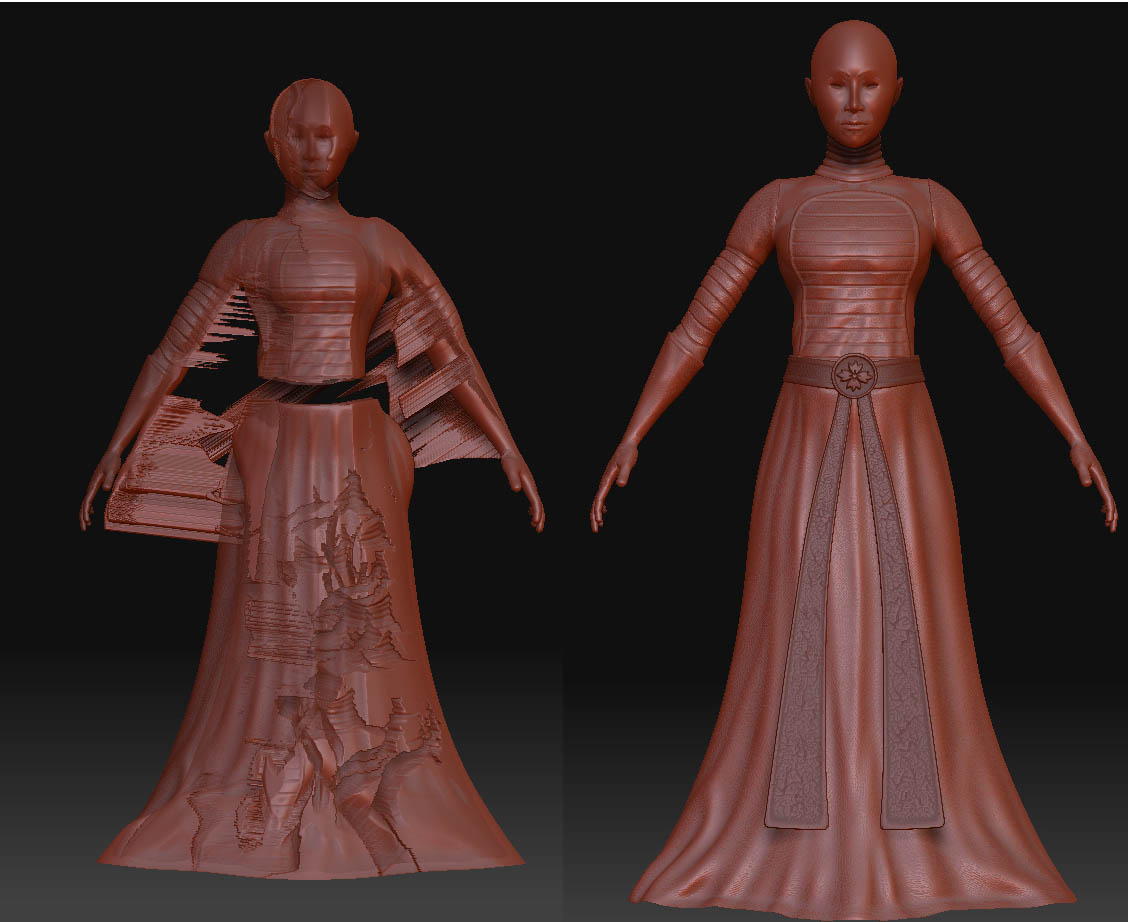
I got the uving redone for the low poly mesh, then realised its either resculpt the newly uved mesh or somehow get the detail from the old mesh to the new one. I scaled the new mesh up in maya, exported it and subdivided it 6 times, the same as the sculpted mesh did the whole transparency, subtool thing and tried the zproject brush, unfortunately, the results were not what I was expecting. Can anyone help please? I’ve attached a pic. The target mesh is on the left.

Attachments

fault.jpg