ZBrushCentral

Face shading / hard edge display

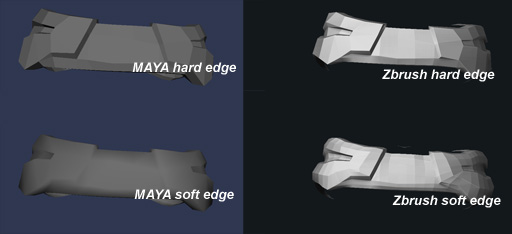
When importing a low poly model in Zbrush the display always looks like the edges are smoothed using a specific way.

:small_orange_diamond: Is there a way to display your model like in the hard edge or soft edge mode in maya?

I need this feature because I don’t want to divide my low poly model but just to tweak it (blendshapes). And the current display doesn’t show me how the model while react to a Game lighting system while I need to see each polygon’s reaction to light.

I hope my request is clear enough… thanks!
The closest you can get is to turn off Transform>Quick and set Tool>Display Properties>DSmooth to 1.

Then set DRes (right next to DSmooth) to a value of 2, 4 or 16. Those values will temporarily smooth your model any time you’re not directly interacting with it, and will use the algorithm that’s a multiple of 4 polygons for every 1.

You might also want to turn Edge Smoothness (ES) to 0.

thanks for you reply.

The problem here is that I am working with low poly model for a game. I would like to see my mesh unsmoothed but still with soft edge. In order to estimate the vertex lighting I will get ingame. I know this a very specific request but very useful for game production.

the problem is each time I change any Display Properties is alterates the mesh itself while I would ideally like to keep the mesh topology and just change the display. Here is an example:

Attachments

test.jpg

Yes, I understand why you want it. The only way other than adjusting those sliders is to launch ZMapper. Because ZMapper uses OpenGL the smoothing is similar to smoothed normals - but of course you can’t model while viewing.

Ok I see. Well I think It would be a great feature to have a shader faking (?) an OpenGL display, it would help people from the game industry a lot :+1:.
Espacially for places where each poly placement is important on a model (like the corner of the lips, betwen fingers etc etc…).

:small_orange_diamond:This is also related to an other post I made yesterday about getting to see normal maps in Zbrush (having a NormalMapViewerShader like the Bump one). If we would be able to see our InGame models with diffuse, specular, normal channel (like you would see it ingame, or in Maya2009) and than beeing able to tweak it (repaint texture AND reshape model), than would be ideal). Zbrush4 ;)?

Thanks a lot for your answers.