I tried searching for this but didn’t really find the results i was looking for. I’m trying to get the eye subtools to be effected by the eyelid geometry. Specifically, i try and model the eyelid around the eye, but it’s ignoring the eye subtool and is pulling geometry from behind the eye and is making a really messy eye cavity.
I know there’s a way to make the geometry effected by subtools, a way to where i could put an eye in a mesh, and wrap eyelids around the form instead of pulling from behind it but i forgot how.
Anyone know any good links to tutorials or videos solving this? or is there just some kind of way to tell my mesh to be effected by a given subtool? thanks!
I’m not sure, but I think you might be referring to the Matchmaker. Click here for ZClassroom and the watch the first video in the “Latest Tutorials” bar called Matchmaker Basics.
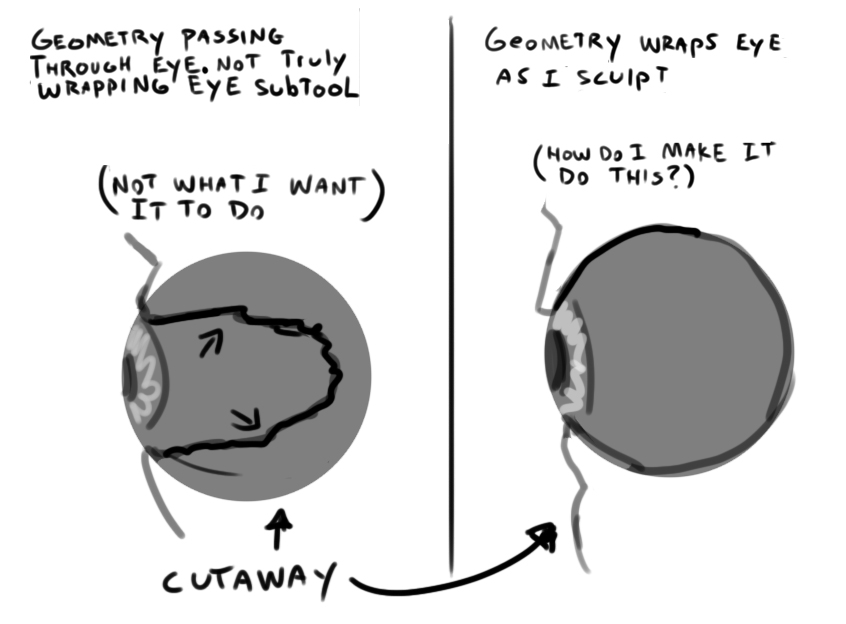
Hmmm… that’s actually good to know about, but here’s an image that hopefully better illustrates what i’m trying to do.
The problem is i’m trying to sculpt eyelids around the eye but it’s pulling from behind the form and isn’t really wrapping them at all. I just want it to dodge the eye subtool when i use something like claybuildup for the eyelids so it doesn’t destroy the eye cavity geometry.
Attachments
Working on one subtool will not be affected by any other subtool i.e: you can not sculpt on one subtool and have it layer on top of another subtool. If you want to create geometry that adheres to and follows other subtools, then you can use Retopology using the appended ZSphere method. Otherwise, if you don’t want a part of the subtool affected, you will either have to mask or hide the portion you don’t want affected.