ZBrushCentral

exported texture map problem

Hi

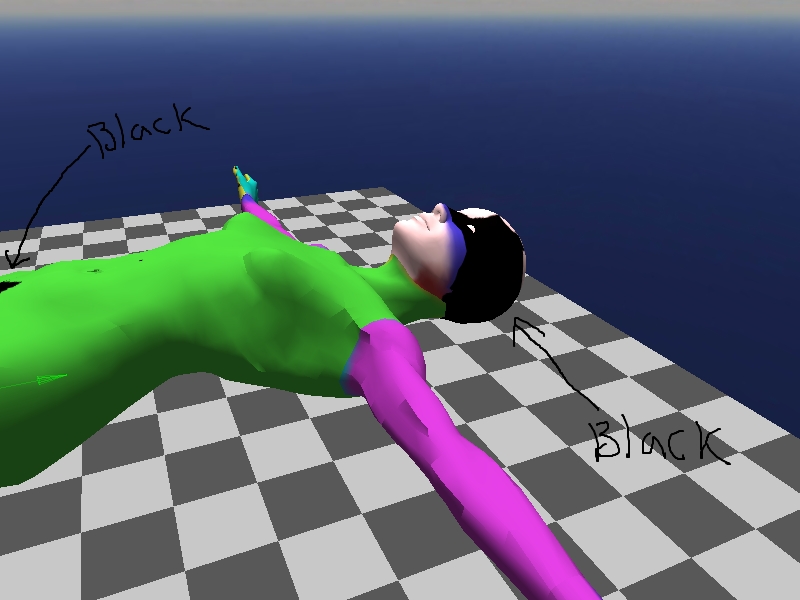
im having a problem with my texture maps. i use a free uv mapper tool to set up my models in zbrush. when i paint them it all seems to be fine. but when i export the model and the texture to use in another program, i get black patches on my models. i think i know where the black is coming from. from the picture i have uploaded, you will see i have pointed arrows on the texture map where it is transparent. but when the map is exported these parts are exported black. so when I wrap the texture around the model the black is also applied to the model. the models seem to have the map correctly applied other than the black patches so i think i have set them up right to begin with. i have uploaded this simply painted model so i hope people understand what i mean. i have tried to use models in a free game engine. but i don’t think thats the problem because i have set up other models fine before when using other painting software. just think i maybe missing a step or two before i export my map, but im not sure.

thanks

What do you mean about parts of the maps being transparent? It’s tough to figure out, since your image shows the problem areas on the texture, but not on the model itself.

I have only painted this model with bright colours, no black at all.
you will notice the black patches on the model. The parts i refered to as transparent are the parts i pointed to on the first picture. What i mean by that is, the texture map is square and when i paint the model the texture on the model goes onto the texture map. However it doesnt entirely cover the square map, there are parts that are not used. In zbrush these parts are transparent. they are only dark because of the dark zbrush interface behind. if zbrush’s interface was white they would look white etc. But when i export the texture map these parts are not exported transparent they are exported black. When the texture map is applied to the model I get black patches on the model like in the second image. I think (though not entirely sure) that these parts are applied to the model and that is why i get black patches. I would like to know how to do it correctly so this does not happen.
(If you notice the colours of the model in the second picture are different thats only because this was a different test model, as i deleted the previous, so not important. I did try this with a properly painted model and the eyes and mouth etc. were all in the correct place, but i had black patches, so i dont think its because its not wrapped properly, but again i’m not too sure).

Thanks

Attachments

uvexample2.jpg