ZBrushCentral

Exploding Polys

Hi,
So i’ve been plagued by an error as of lately. Whenever i Import the same model .obj into the .ztl all seems well until i go from subdiv level 1 to something higher and the polys explode (see first head) and its a lot worst than that example.

I’m importing the same model on its lowest subdivision of 1 into the ztool to replace its UVS. I’ve done it before with another model, im not sure as to why its not working now.

My workflow is Sculpt in zbrush, export low sdubdiv .obj to maya for UVS, export back into zbrush.

I thought it might be because i moved something on the maya .obj, however i tested it by exporting a clean .obj to maya and simply doing automatic uvs and importing back into zbrush and it still exploded.

[

](javascript:zb_insimg(‘137285’,‘error.jpg’,1,0))
Ah crap, just realized i posted this in the wrong subforum, sorry bout that.

Hi

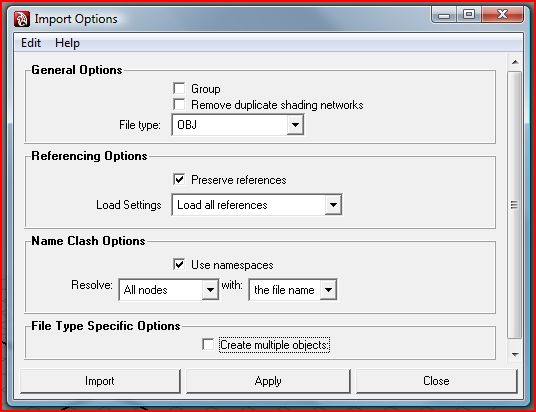
This is a common error when importing a zbrush model into maya. The vertex id gets randomly changed for all the vertexes in the object when the “Create multiple objects” box is checked.

To fix this simply import the original obj to maya with the “Create multiple objects” box unchecked like shown below.
(You will need to create a new uv or use the “Transfer attributes” feature)

Attachments

maya_obj_import_options.JPG

Hey BoneCandy.

Common maya problem. In you obj option untick the box the says ‘import multiple objects’. It will change the vertex order when you export out of maya and back to ZB.

I pretty sure it is import multiple object or groups unfortunately I am rendering so I can’t check but when you open the obj option you will see the tick box at the bottom of the window. Just make sure it is un-ticked and it should solve your problem.

here what you can do…

in zbrush del lower subdivisions after switching to highest level.
then use reconstruct subdiv to bring it to lowest level.

and export that that 1st div to maya and unwarp( or tansfer map from unwrapped head) it and than import it back into zbrush…

it should work…

EDIT- solution by scottleroc seems easy.( never tried it this way:o )

Thanks guys so much! Now i can move on with this damn thing.

cant wait for zbrush 4 in august!