ZBrushCentral

Editing Polygons in Zbrush

Hey I’m still learning Zbrush and looked at this thread http://www.zbrushcentral.com/zbc/showthread.php?t=44876&highlight=edit+polygons but my problem persists with the Edit Topology step. When I get to this step I only see select Topo and Delete Topo. What am I doing wrong?

I made the mesh into a polymesh 3d, and did all the steps. Now I have a zsphere smack in the middle of my model. I cannot go any further.

I’m using 3.1
post a screen grab. I’ll have to see your settings and whatnot.

someone else might be able to help without seeing it though.

Ok. Heres what I did.

  1. Made model into polymesh 3d.
  2. Cloned the model, rigged the SDiv 2 to Select Mesh and selected Topology with the Sdiv 1 of the other clone.
  3. SO far so good. Then click Edit topology. Make changes as necessary.

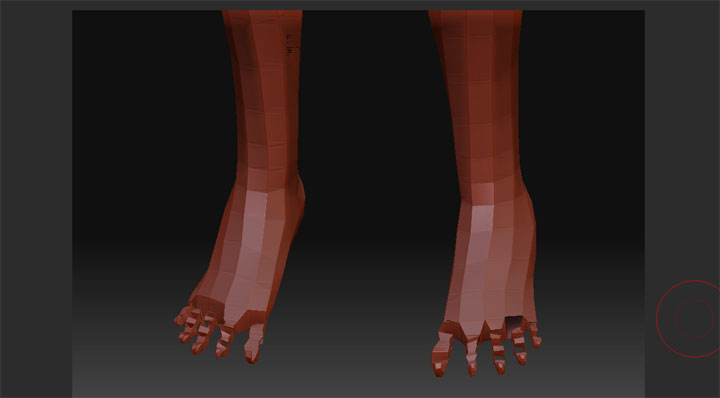
*4. Press A. Things go screwy. Look at my models feet (After I press A).
*5. When I rotate the model around I get black pixelation fragments on the model after I do this process (for example look at the top left of the picture.)

I tried making adaptive skin and still have the destroyed feet. I can go in Maya to make changes to my mdoel but if I can figure out how to fix this in Zbrush it will speed things up so much.

Attachments

1.jpg

if you’ve already loaded your rig mesh (in Rigging) all you have to do is clic edit topo and start a new topology on top of it.Or load a topo and use it as base…depends what you want to do.
screenshots might help figuring where you’re at though

you need 5+ sides to extrusions…i.e. fingers toes, etc. If they have to be 4 sided, then just add the extra edge to it in zbrush, then take it back into maya and delete the extra edge.

you’ll have to use the project all button in the subtool panel get rid of the extra edge in maya. so look into both options and figure out which works best for you.

the black stuff is a display issue, most likely with your graphics card. anyway, you can fix it.

tool>display properties>turn off “double”

that should fix it…it will also let you know if your mesh is inside out and will need to be flipped.