ZBrushCentral

Easy question on Deforming a subtool

Hi there!

I did a mechanical part in Shadowbox and used this part several times in my Model. But now it appears that I want to make it smaller in one axis, but I don’t want it to deform. For a better understanding here’s a pic:
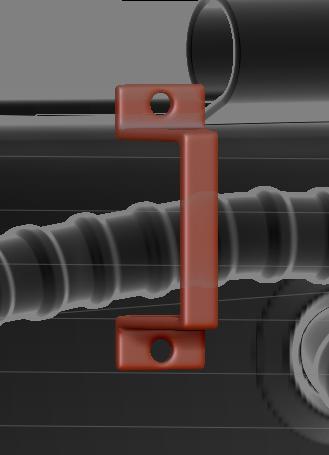
It’s a holder for that pipe you see and is made to hold 2 pipes. Now I want to shrink it in y-axis but preserve the shape and the thickness of the rest to match the other holders. Simply said I want to cut a piece out of the middle.

I tried with the Deformation Subpalette, masking and transpose. But every time the part deforms which looks pretty nasty beside the other holders.

I can’t think of an other solution for this problem (besides make a new subtool). I’d really appreciate if you could help me with this little problem. Thanks in advance!

Transpose normally does it for me. Maybe the offset deform +blurred mask if the axis allows for it.

The SliceCurve brush may be what you want. Divide the mesh into separate polygroups, delete the middle one, then weld the top and bottom together.

Edit: Similarly (and better described) divide the mesh into two polygroups using the SliceCurve brush, hide one half (Ctrl+Shift+LMB) and then delete hidden (DelHidden button in the geometry palette), offset the remainder a bit, then mirror & weld using the geometry palette would work too. Or you can turn it into a single dynamesh. You may have to use mirror in the deformation palette first if mirror & weld goes wrong.

I think ‘Mirror And Weld’ in Geometry subpalette would be the way to go, as Zeddicus has said, but you don’t have to cut the mesh in half first if your using 'Mirror And Weld. You just need to offset it. See image below.

new-3.JPG

The hint with mirror and weld worked out perfectly and smooth. Thank you all so much for your answers!

Cool, I did not realize that. I just posted the steps I took while experimenting to find his answer. Didn’t take any time to refine it, so thanks for commenting and the images. Always learning (or relearning) something new! :wink: