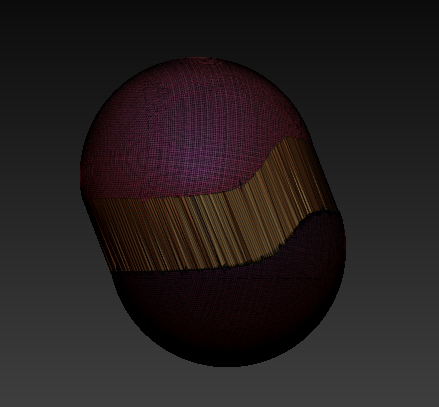
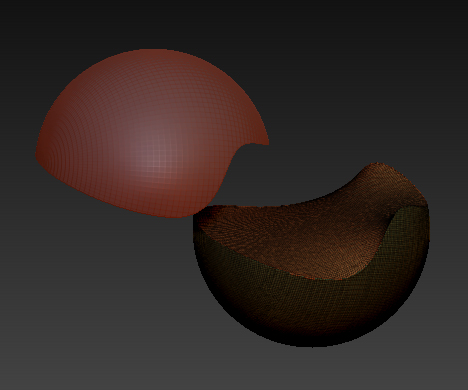
Hi, while I have been enjoying using Zbrush for a bit now I am still a new user. Hopefully this is the correct forum for my question. I have recently started exploring using dynamesh more and have been having an issue with using slicecurve to divide the mesh. while the tool does create groups and clearly shows where a line where it was used when I go to pull the mesh apart the mesh isn’t completely separated. Now if I use a simple 3D mesh, split into groups with the slicecurve and then dynamesh the group it will fill in the missing face of the shell. I have looked at tutorials here at Pixologic and at DigitalTutors and while this seems to be a very simple operation to execute I cannot get it to work properly. Thanks much for any help that can be thrown this way.
Not sure from your question exactly how you want the end result, but from the first picture it seems you just want two polygroup shells seperated? Why not just go into Subtool->Split->Groups Split once you have the subtools created from the slice operation?
When you dynamesh I think that is normal for the way it fills the void, it is basically using the fill holes command in Geometry->modify topology->Close holes
You can test it out by seperating the two polygroups and then running that command on them. What might be a quick fix for you to try is to basically dynamesh them like you did already, and then redo the clip/trim curve on each piece to flatten the results from the close hole command - you might have to mask off the outside shell and then inflate the geometry on the inside so that it will all be cut away when you trim. Not ideal but you should be able to get a flat result that way
Thank you for your reply, James. I am just perplexed as to why I can’t get the program to perform an operation which is easily demonstrated in tutorials, including the dynamesh tutorial here at Pixologic. In these tutorials a dynamesh can be created, divided with the slicecurve tool, updated, and then pulled apart into two separate pieces with the faces created by the division filled in. It’s not that I can’t create the same effect in other ways it’s just that it is so easily done by using the slicecurve tool on dynameshes, at least in the tutorials, and for me the procedure doesn’t work at all. On top of that it is such a simple operation it is hard to imagine how it can be screwed up. I almost feel it must related to something in my settings although performing an initialize of Zbrush hasn’t changed the issue.
Oh ok I understand a bit better what you’re after now.
just slicing a simple sphere and then dynameshing with groups it will create 4 polygroups, the two you created with with slice brush, and then the interior fills. When it stretches like you show in your first picture that is because you are only moving the outside polygroup, the one in the middle is masked. There may be an option somewhere to change this behaviour but I cant find it - a simple workaround though is to go into the polygroups tab, and then hit auto groups. This way both of the pieces you sliced are stored as their own polygroup, then you’ll be able to move them around as you intend.
Actually it looks like those seperate planes are a new feature in r6, I just tried to do the same thing in my copy of r5 and it only creates the two polygroups so it works exactly like in the videos in r5.
Same Problem here… I was looking as some tutorial at the Pixologic website about Dynamesh and splitting and object into 3 pieces by suing the Groups feature in the Dynamesh…It works perfect in 4R5 but in 4R6 it creates extra geometry…
Kind of sucks… Now I have to do extra steps to seprate the object…