ZBrushCentral

DynaMesh Question

I wasn’t sure if this is the best place to post this, but in the presentation for the Division they use dynamesh master to subtract different meshes from their base model.

https://www.youtube.com/watch?feature=player_detailpage&v=MVHPSnBlIrU&list=UUV5GP2bOZidBB2C0wxdMDmg#t=1590

I have been trying to get this to work all day, following the steps they use step by step, but every time I try click on the dynamesh button again it just combines the two models. Is there some setting that they’re not showing or something specific the meshes need to have something specific set up on them?

I’d really love to use this method, and it would lend itself perfectly to my current project but I can’t get it to work. Thanks in advance to anyone who can help me out here.
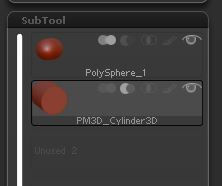
There’s sometimes a glitch that if the ‘cutting’ shape(the shape you want to subtract) is of higher mesh density than the base shape you are subtracting from, the boolean procedure won’t work.

I can only presume how you are doing it, so will try and explain:

You have two subtools right? The one you are using as the cutting tool/shape (has to be have lower polygons than the one you are cutting from)

Make sure you have set the cutting tool/shape to Boolean subtract in the subtool, as per the image.

You then need to merge down (Tool/Subtool/Merge - MergeDown) and then hit dynamesh in dynamesh master.

That should do it.

Attachments

boolean.JPG

I did get it to work by breaking up my subtraction mesh into multiple pieces. I set dynamesh master to 3 million polys, but it’d only get me 444,000 according to the readout. So it was pretty low poly still (not sure what’s up with that) but this worked so we’re good :slight_smile:

Thank you guys for your help