ZBrushCentral

Dynamesh mystery - Smoothing Spikes. [Answered]

Heya

One of my educated colleagues is trying to dig into the dynamesh university. Unfortunately he found something he couldn’t resolve (and shame on me I couldn’t also). It’s the dreaded Mr Spike.

He tries to make a boolean, and after the remeshing a spike appears that can’t be smoothed, polished, and so on, and later it might be an extremely thin spike (depending on the resolution)

See image :t

Cheers,

Attachments
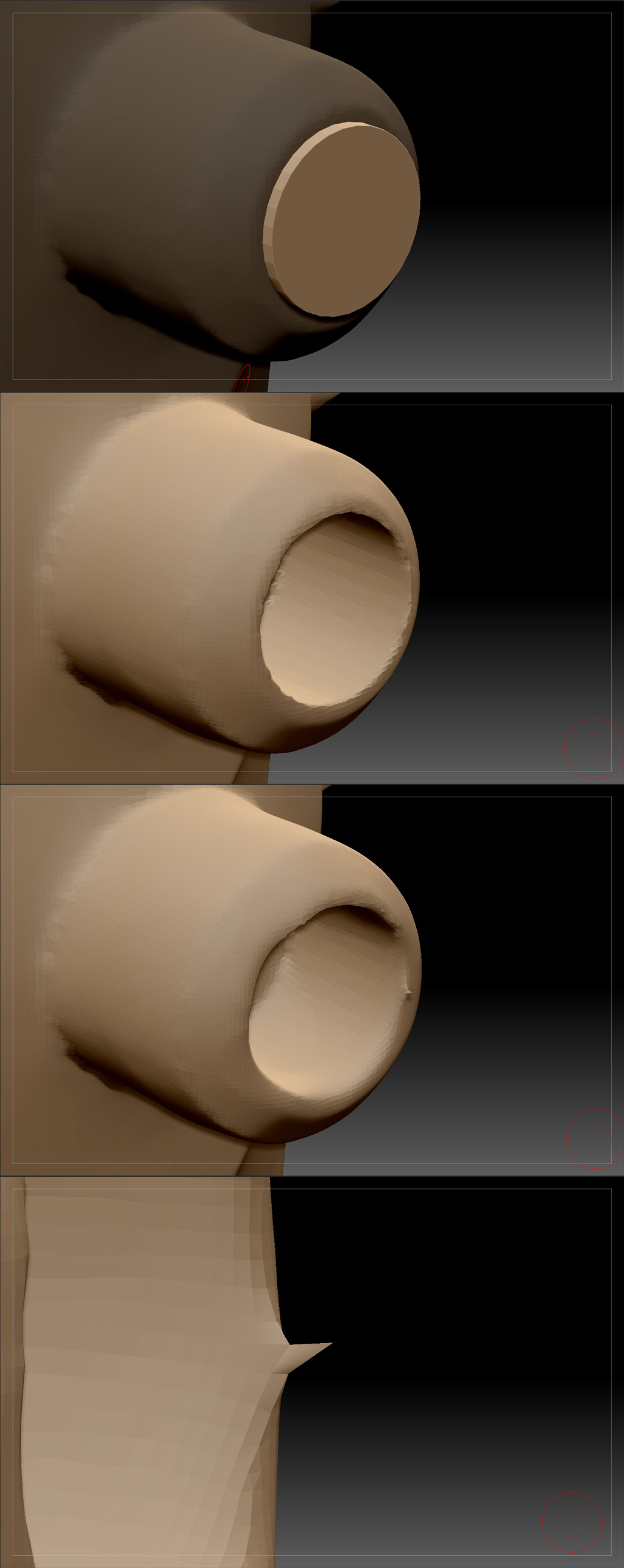
zbrush_dynamesh_bug.jpg

While in DynaMesh mode, you should be able to easily smooth spikes. If you have existed DynaMesh mode (or made a PolyMesh3D from a DynaMesh object) and encountered spikes, then simply set the [COLOR="#FFFFFF"]Brush:Smooth Brush Modifiers:Min Connected Point to 1. This activates the ‘smooth all’ mode which will allow you to smooth all vertices, including region-border and spikes.

Note: When DynaMesh mode is active ZBrush automatically uses the ‘smooth all’ mode ( regardless of the value that is assigned to ‘Min Connected Point’).

I hope that this solved the ‘Dynamesh mystery’ :)