Question 1
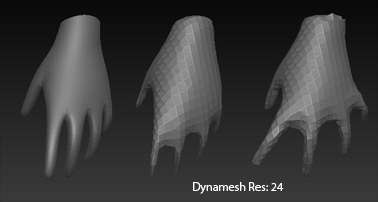
If I DynaMesh a Character DynaMesh will merge the toes together.
Any suggestion on how to keep the toes separated ?
Question 2
If I qRemesher a Character qRemesher destroys the toes.
Any suggestion on how to keep the toes ?
Thanks a lot.
Question 1
If I DynaMesh a Character DynaMesh will merge the toes together.
Any suggestion on how to keep the toes separated ?
Question 2
If I qRemesher a Character qRemesher destroys the toes.
Any suggestion on how to keep the toes ?
Thanks a lot.
Up the resolution, use the Project toggle option, and don’t be afraid to spread the toes out for now (since you’re really just creating a basemesh) and transpose them back closer together once you no longer need to remesh the tool (here’s a somewhat similar example, albeit with fingers instead of toes).
You lost me with the " Project toggle option " Can’t find that tool ,where might that be found at ?
Don’t know if it matters but I’m importing low polycount meshes that I’ve made over the years from TrueSpace ,Lightwave ,C4D in to zBrush.
Next to the larger dynamesh button, there’s a tinier button that says project.
Are your models quads or tris?
When I hover the mouse over Project next to the big DynaMesh button the pop up reads “ReProjected DynaMesh” So I was not sure if it was the same as “Project toggle option”. No I am not the brightest Light Bulb.
I’ve tried Project and think I’ve tried every button in zBrush.
It’s not just toes it’s different stuff on different meshes.
All I know is you can’t have them to close togeather.
TrueSpace 3 did not have SubD’s ,TS4 did not at first but got a SubD Plug.
LW 7 SubD’s Tri’s.
C4D 9 Can Make frozen SubD Tris.but if you want regular SubD’s you can turn up or back down ,only Quads.
Some where along the line the rule was made ,loops ,all quads.
My meshes
Some all tri’s.
Some,topolagy is not flowing has 50/50 quads n tris.
Some all quads.
I’ve tried Project and think I’ve tried every button in zBrush.
It’s not just toes it’s different stuff on different meshes.
All I know is you can’t have them to close togeather.
It’s the same principle (concerning dynamesh); the finer the details you want to preserve (which includes gaps between things), the more resolution you’re going to need to accommodate it. If the resolution isn’t enough then you can either scale the model until it is, or widen things up in order to give the model some breathing room. If the higher resolution proves too taxing on your system then you could look for logical ways to split the mesh up (natural seams, or places where such a seam would be hidden). Likewise, if the details you’re trying to accommodate aren’t part of a single object, there’s a good chance doesn’t need to be dynameshed as such (offset it, dynamesh, then offset it back).
If you’re aiming to do a full organic body with no clothes to hide any seams, it could be beneficial to treat dynamesh a bit differently. Personally it’s not something I would use to carry a sculpt all the way to the end unless I’m doing a simpler shape/style, or doing more of a speed sculpt. If I were to build such a full character with only dynamesh, I’d aim to keep the resolution as low as I can (extremely basic model, with stubs for the feet/hands). Then I could turn dynamesh off as soon as possible, extract the digits and other tight details out with the old edgeloop tool or transpose’s newer extract features, and then subdivide and sculpt the mesh from there.
Option B would be to hammer out the overall shape (not really worrying too much about the vert count or details), and then retopologize it from there. I know you haven’t had luck with qremesh either, but that’s only one solution (and even then, could be a partial one; you could probably let it handle the heavy bulk of the work, and then switch it over to the older zsphere toolset or GoZ it to another program and finish up on the tighter areas that way).
Here’s a wip that show really well what I am talking about.
I know the 100% flowing topology quad rule.
I Can’t follow those rules and get what I want.
Spend all my time fighting with quads and topology ,not modelling and get no where fast.
When I finally have a 100% flowing topology quad mesh. When Rendered It does not look like I wanted.
So I’m not following the 100% flowing topology quad rule.
Don’t need rules that hold me back.
I know my topology is tri’ed unbalanced and every other bad thing but it Looks like I wanted.
To at least balance the mesh tried ,Remesh ,DyanMesh ,qRemesher ,Unified Skin. It’s not happening.
Any suggestions on what I should do now ?