Hi…i dont know if should i post my problem here…if not sorry for advance.
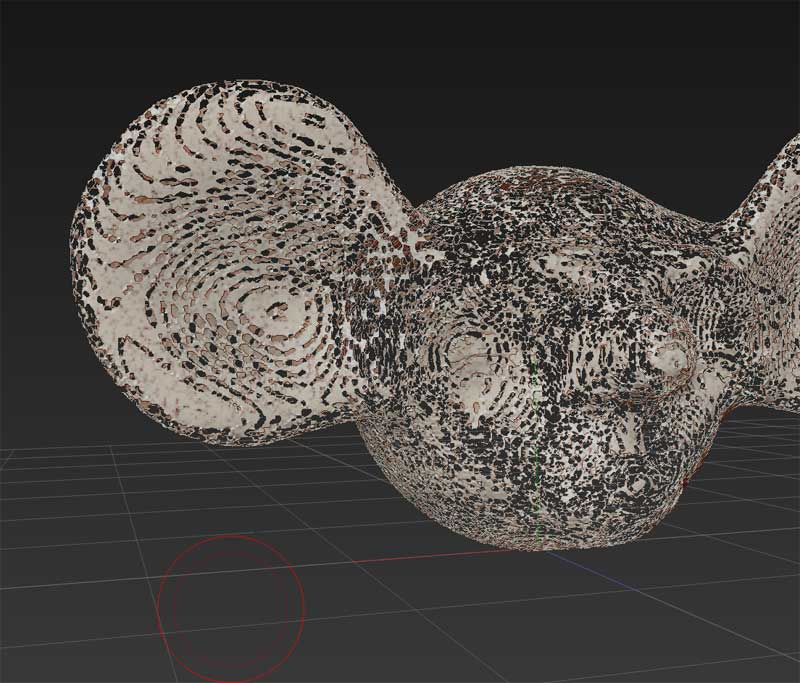
My problem is when i begun to sculpt with dynamesh suddenly my mesh become like that…
Anyone could help me pls ?
Attachments
Hi…i dont know if should i post my problem here…if not sorry for advance.
My problem is when i begun to sculpt with dynamesh suddenly my mesh become like that…
Anyone could help me pls ?
Yes, im getting similiar artefacts in places on my mesh. I think it’s a thikness problem ?
I dunno, im still exploring the program 
the same happened to me, check the res on the dynamesh tab turning it up clears the issue up for me:)
thks guys…i ll continue to explore then…
seems to happen to me when i use sub inflat on things and push too far in. The mesh loses structure and when remeshed holes get created.
cleaner solution then upping density is to use clay brush and polish back and forth to to smooth out the surface and fille in gaps… then remesh again and it should be a solid surface.