ZBrushCentral

Dragon scales

Hello
I wonder how the author applied the scales to the dragon’s head. They are perfectly arranged on the surface for it to be done just by an ordinary brush. This is probably the author’s own alpha, but I am specifically interested in only applying it to the surface and the manner of wrapping the sample around the eyes and mouth. I attached an image of the area that I am interested in. Could you write me, how it was done, or give me a link to the tutorial?

Thanks

Attachments
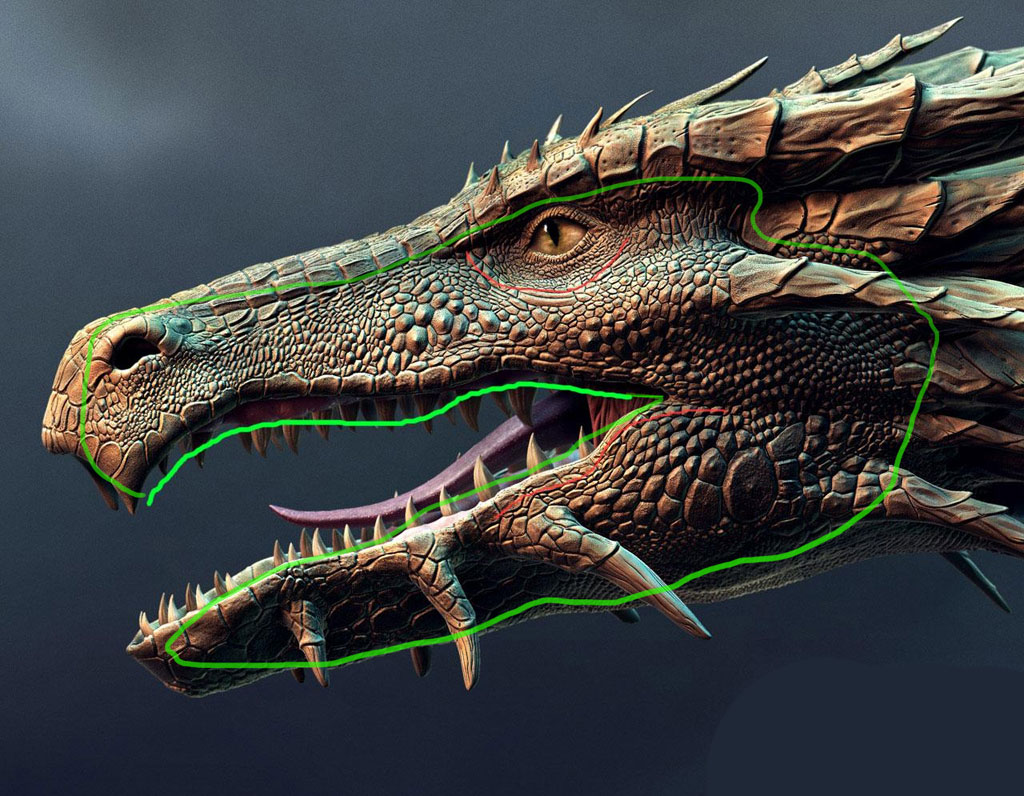
docas1.jpg

In this tutorial DVD Michael Pavlovich shows an interesting way of doing scales, http://eat3d.com/blog/eat-3d/new-dvd-release-zbrush-35-character-production Basically he unwraps the lowest subdivision then uses mask by alpha to apply that alpha cleanly over the entire model. He stored it as a morph target, then switched it so he could paint where he wanted the scales. Like most things in 3d though you will probably need some manual intervention. Automated processes are a good starting point sometimes, but some areas would need to be done by hand.

Also I have not tried this particular technique. You may be able to get the varying density and flow of detail by distorting your UVs. He may have also simply masked lines by hand and then inflated the surface.