ZBrushCentral

Does anyone know how to fix this problem?

Have been working in symmetry since I started this model, hid all of the model but the hands and when I unhid I had this point/poly out of place. I’ve tried smart resym, and while it moves the point back it screws up the mesh (made from a dynamesh mesh). Resym alone does nothing. I cannot even move the point with the move brush. Does anyone know how to fix this without messing up the mesh?
I’m also troubled to discover that my Dynamesh does not have symmetry. Is this by design?

Attachments
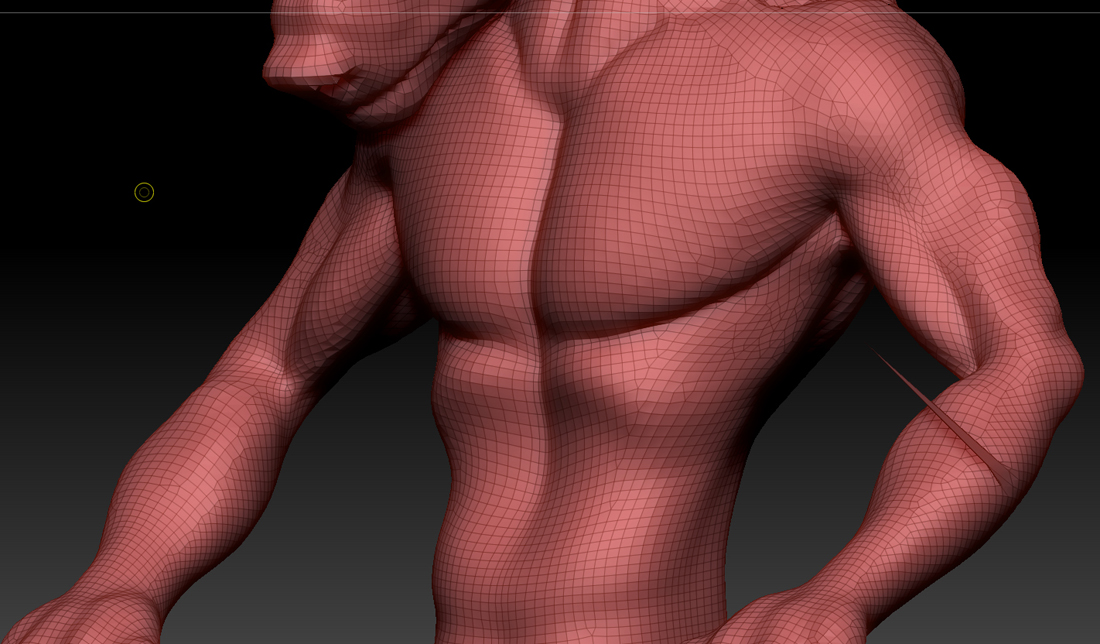
point_error.jpg

I thought I was able to fix it with the smooth brush but every higher subdivision level has it creates another spike. Looks like 5th subd level fixed it, with the smooth brush.

If the actual tolpogy isnt symmetrical, you can fix that with mirror and weld.

I’m more curious to know how Smart resym messed up your mesh. (Did you mask the “good” side first?)

I sure did. The dynamesh topology (and I say Dynamesh in referring to the fact that it was created with Dynamesh, I not longer have Dynamesh on). became really funky. Certainly didn’t match the other side.

I should also mention that the very original topology was made with Zspheres,then I turned on Dynamesh and played around a bit. I have had symmetry issues with Zspheres before, but usually it’s only been around the midline (thought it’s possible it was elsewhere and was very hard to tell considering the nature of the topology). I will have to try that mirror and weld thing. Have never done that.

I’m pretty sure Ive gotten skins from from zspheres that had minor asymmetrical variations, but it’s been a while. Again, though, Mirror and Weld will fix that right up.

Thanks a lot Spyndel! For all your help.