ZBrushCentral

dividing in sections a subdivided body

I was trying to segment a subdivided body in smaller pieces and then close holes. Split hidden (or delete hidden) system for splitting the parts was systematically introducing an intense unwanted noise on the surface. It has taken me long to understand that split polygroups has not this problem and leave a clean geometry.

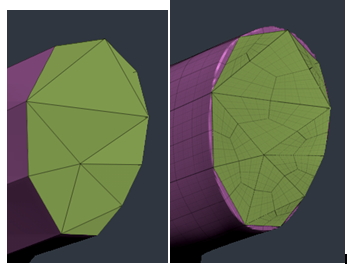
But then when trying to close the holes on the subdivided fragments I’m forced to freeze subdivision levels. And this happens:

If I simply avoid freezing and I delete high res subdivisions and then I try to recover the detail projecting from a high res copy (also with the holes closed) then this happens:

It is a lot better, but the new closed hole never gets any kind of smoothing deforming the surrounding polygroup. Apart of being a slow system and being forced to subdivided with the smooth off to avoid destroying the edge. Anyone knows a better workflow for dividing in sections a subdivided body?

Attachments
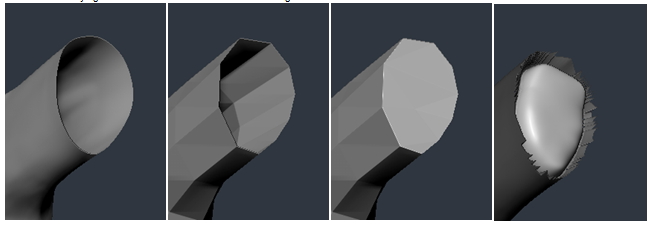
Image 032.jpg

Image 033.jpg

You have ten edges.

To get a much nicer result I would remesh this cap surface with ZModeler:

  • delete the cap so as to get a hole
  • ZModeler Edge Bridge for that long central polygon from left to right
  • Edge Split to add those two blue vertices
  • Points Bridge Two Points to make it two polys
  • then four times Edge Bridge to add the four remaining polygons .

zbrush10.jpg

Thanks for your help Erik. But the problem is not related to the topology of the geometry that closes the hole. I can do the same type of topology that you indicate (something that I do normally) and I get yet the same exact problems.

This is the maximum quality I can get, but as you can see the topology of the polygroup used to close the hole doesn’t fit the perfectly. And it is a very convoluted workflow where I need to subdivide without smooth, project from a copy in high res, deformation polish by features to the topology that closes the hole or will remain hard etc. Not very practical. But freezing subdivisions creates noise and big artifacts in the edges of the cap hole.

Image 041.jpg

QCylinder(in closest orientation and enough resolution to block in whatever it is) and the ZModeler brush :wink:

you may have a crease.

perhaps you can isolate and share this part of your mesh?

Just tried creasing. Initially looks fine, certainly better than without creasing, but as the other method the polygroup used to close the hole shrinks and doesn’t fit any more the edges. This means than in lower subdivisions there is a taper effect. Also it creates spikes in the edges that can be eliminated with polish by features.
Image 052.jpgImage 053.jpg

I have included the test file if you want to play with it.

I can sense your frustration. More than once I’ve been stymied by something and just tried a different workflow. Did you try my suggestion?

Correct me if I’m wrong but I think you are suggesting to start with a Zbrush cylindrical primitive, the new ones that are editable. I tried but I had less controls over the extremes. I mean where the bottom and top of the cylinder are don’t fit better than the other systems. The idea was to reuse the low poly without being forced to re topology again.

I found that way to do it with the system that I explained, simply it is a bit convoluted and long (subdividing without smooth, projecting etc)