ZBrushCentral

distorting texture

Hey,

I’m kinda new here. I haven’t used zbrush whole lot. I got my hands on new version (3.1) and I have texturing problem. See, I made my base model in maya. First it did not have the base so that’s why I thought the textures didn’t want to work properly. So I went in and made it a whole, closed mesh and imported to zbrush, modeled up and all and went to projection master. I painted part of the model, then ‘picked up now’ and the texture got all distorted and squarish, might’ve even repeated twice on the model. Today I modeled another thing from a sphere in zb and didn’t have problems texturing that one.

So what’s wrong? is it because it’s a maya thing? or i need to change some settings?

Thanks

Screenshots might help :smiley:

Seems that you have’nt done the UV layout in maya

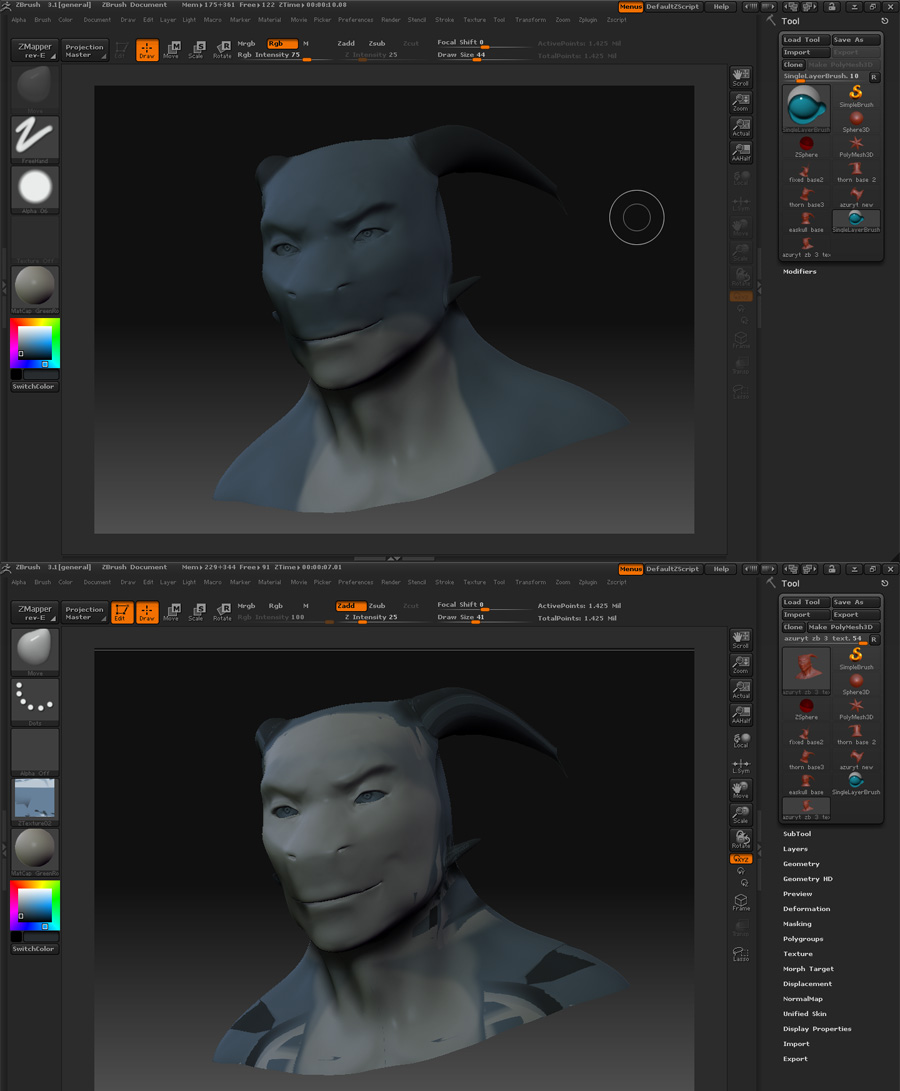
ok here it is. 1 being in projection master, 2 after i leave it. This model does have holes on the tips of his horns, but I went back to maya and fixed those for the basic mesh (from which I built that one) and the same thing happens. Does it matter if there are holes? I really don’t think I can remake that model, or the other 2 for that matter.

Attachments

problem.jpg

It doestn’t matter if you have holes in the mesh… as far as i can see in your pics… well, you are missing your uv’s… The texture is a little messy, so that indicates that the uv layout is somehow distorted or with overlapping uv’s…

Try assigning your model a checker texture… if it is distorted, then you need to layout your uv’s in maya and import them (export your lower geo level, impor it --> Creating a single object <-- layout uv’s in maya, reimport the obj over the tool and fix it.

Another workaround is to use the Guv tiles in zbrush to automatically make uvs