ZBrushCentral

Display problem when retopologizing.

Hi everyone.

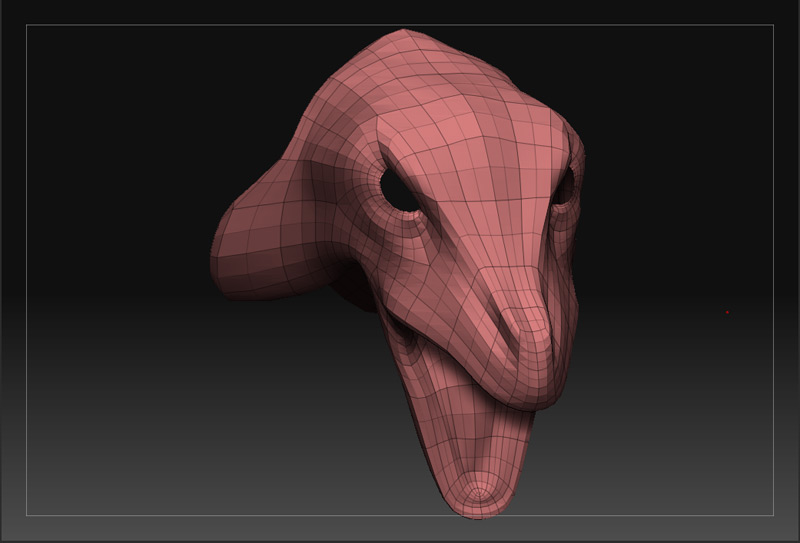
I’m having trouble when I try to retopologize my mesh. I select the highest subd in rigging then I go to edit topology and I select my lowest subd. I click on edit topology and the topology displays weird. Like some parts it shows and some doesn’t. Therefore I can’t work like this because there are vertex and edges I can’t see.

Any suggestions. Thanks

Problem.
z.jpg

Sounds like you’re describing a known bug. Usually turning off and on “Edit Topology” clears it up.

The other issue is that your base geometry may be mostly smaller than your high res. Saving the base geometry separately and scaling up a little may help.

-K

It doesn’t work. I tried turning Edit Topology on and off and still the same problem. Regarding the scale, they fit perfectly.

thanks Kerwin. Suggestions. Help.

Cheers!

Problem.

[z.jpg]z2.jpg

some of your spheres are hidden

ctrl+shift+lfc and drag a box (i think that is the hot key combo for the Green box)

I think you can also go into
tool>masking>show pt

that will fix the problem for you.
happens 90 percent of the time when you give Zbrush a cage to start your retopo from.

actually it looks like an issue you get when you have your Preference>Draw>Front Opacity turned up. Then when your lines fall within your mesh you are not able to see them.

Catch 22. You want to make sure that you do not see your new topology lines from the back of your model however, when you adjust the opacity then you cannot see the ones you are working on… :frowning: