ZBrushCentral

displacement maps seam

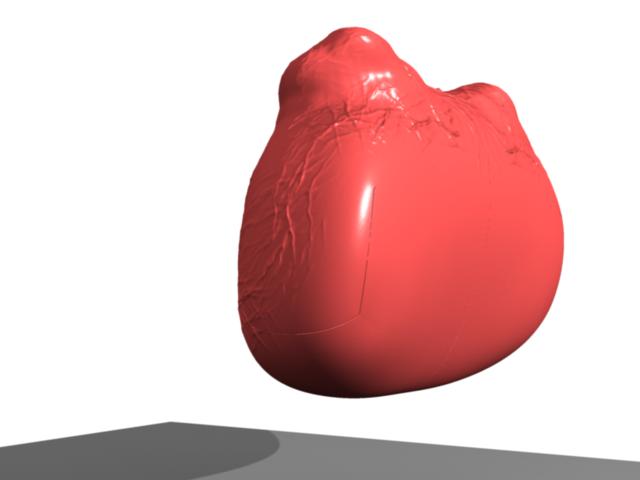
I’m new to maya 8. Just started using it in school. I’m getting this strange export problem with my UV’s. No matter how much of the border i fix in ZB i cant get them not to show in maya.

ZB3 model rebuilt in ZB2
AUV tiled
Fixed Seam at 50 (tried a wide rage of numbers)
Map export with Multi 2
map size 2048
map size adjust 0

Feature Displacement is off
Base mesh smooth divided 1 time (also tried it without smooth)
Mental ray Approx node attached; Sub D
color range set with alpha gain at a half negative value
Approx set to Spatial
min sub d 1
max sub d 3
length .001
view depend off
texture Filter type is off

[attach=61146]m8 problem.jpg[/attach]

Attachments

m8 problem.jpg

Holy cow! Too high a FSBorder value! Turn it down alot!!

I tried at default level all the way up to 50 and got the same results.

Please, doesnt someone know how to fix this problem.

This is the same problem with the seams of my displacement map showing up.
Maya 8.5 and ZB3 export using the standard Alpha exporter this time. The problem seems to be Maya interpreting the map. But I dont seem to be able to nail down the problem.
UPDATE:
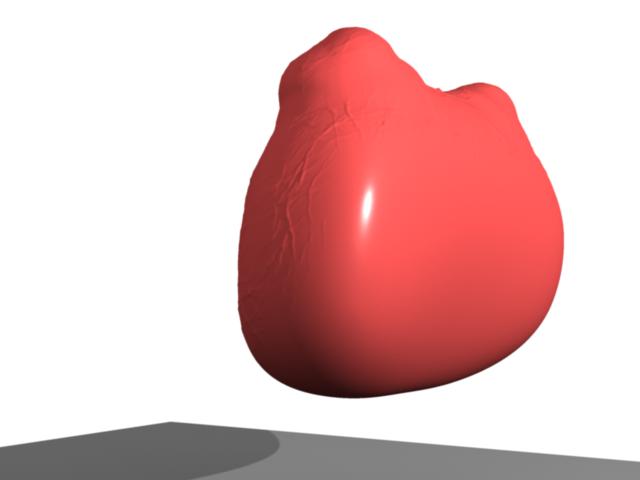
This also has the displacement map as a bump map. with bump map remove the seam problem disappears. But now how do i get the bump map on tho there?

Disp Map Problem.jpg

this is without the bump.

I’d realy like to keep my maps additional detail in a bump like old ZB2.

Disp Map Problem wo bump.jpg

Did you create the bump at the same subdiv level you created the dispmap? That would create some sort of double transformation thing to the mesh.

Also, using smooth UV would sometimes cause those UV border lines. See if it works with it disabled?

Ok, I switched the Diplacement mode to Bump Map Mode and created the map from sub lvl 5 of 7 and the anomally stoped. Thanks for the help feureau.