|Hey guys,
|
I have a problem with ZBrush generating Displacement Maps and I’m at a loss at the moment…
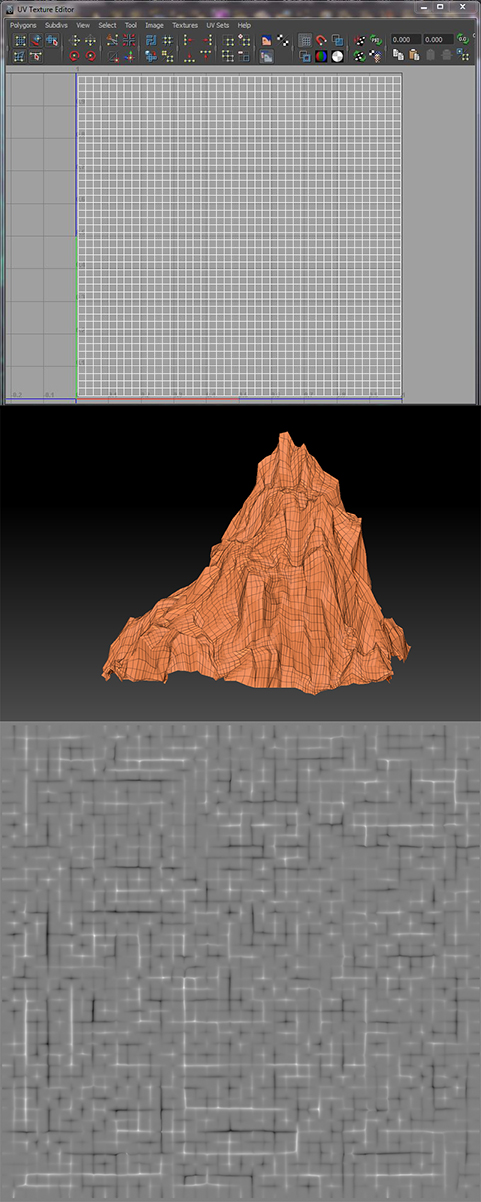
I’ ve got a mountain from Maya with proper UVs.
When I subdivide it a few times to prepare for sculpting and generate a Displacement Map in the Tool: Displacement Map palette, without even sculpting, I get strenghened edges on my Map, where there should be nothing but a monotonous grey.
I tried everything I could think of, different adjustments in the displacement map palette, Smt on and off while subdividing the mesh, but nothing would work.
There are meshes that get proper Displ Maps, but my mountains and some other meshes always get the edgy results.
The Image shows my UVs for the mountain, below the mountain importet to Zbrush with polyframe on and underneath that’s the generated displacement Map.
Does somebody have experienced this problem too or knows how to solve it?
I gladly apprechiate any help!
Thank you in advance!
|
Attachments