ZBrushCentral

Displacement map option not available?

Hi there, I’ve sculpted a fly which I wish to convert to Maya with all the textures and colours, and apply hair and wings there. I tried converting a hi-res model with something else before and I remember it was far too complex to work in maya so I had to lower its res. I’ve not tried displacement mapping before, but zbrush doesn’t seem to be giving me the option. Any idea why?

Thanks

Attachments
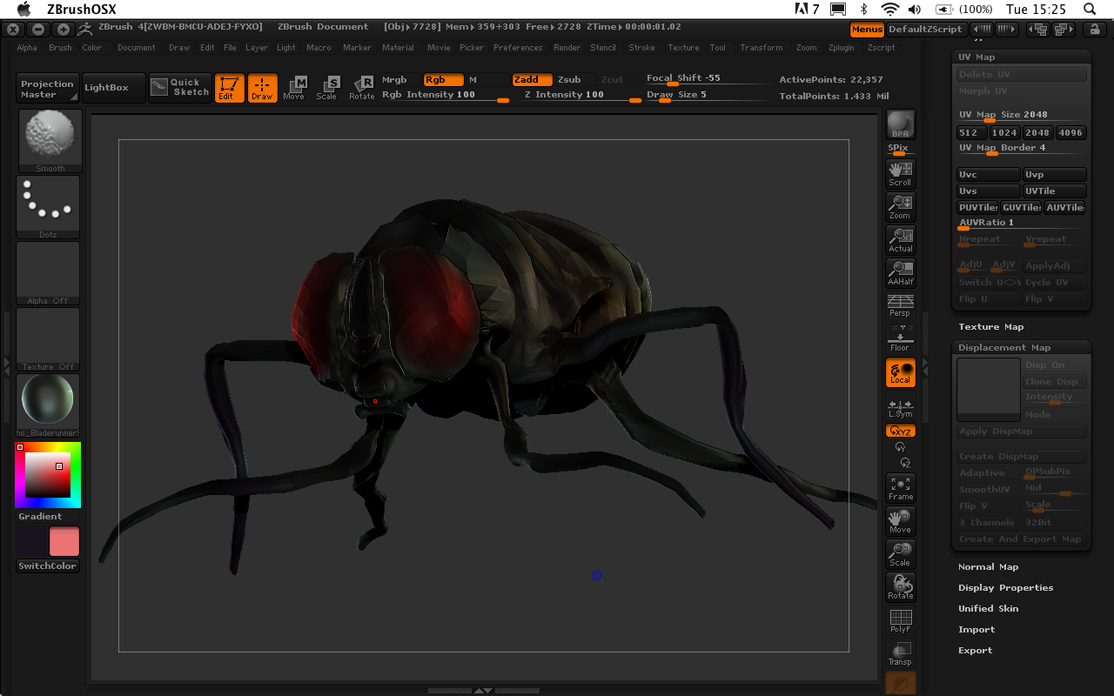
zbrush displacement problem.jpg

First off, your posting is in the wrong section.

Secondly does your model have UV’s? Check under “Tool > UV Map” If the “delete UV” button is greyed out that means your model has no UV’s. You will need to create UV’s with one of zbrush default layout methods, PUVTiles, GUVTiles or AUVTiles before you can create a displacement map.

I do apologize for posting in the wrong section, I’m not familiar with these boards and didn’t know where I should have.

Thanks, I had to go to low sub division and I tried PUV option, it seems to work! What is the difference between PUVTiles, GUVTiles and AUVTiles?