ZBrushCentral

Displacement Map export Issue!

Hey guys,

I’ll go directly to the point.

1 - I exported my model out of 3DS Max using the default .OBJ export options (with Poly). I made sure I collapsed my UV Unwrap to the Poly before exporting.

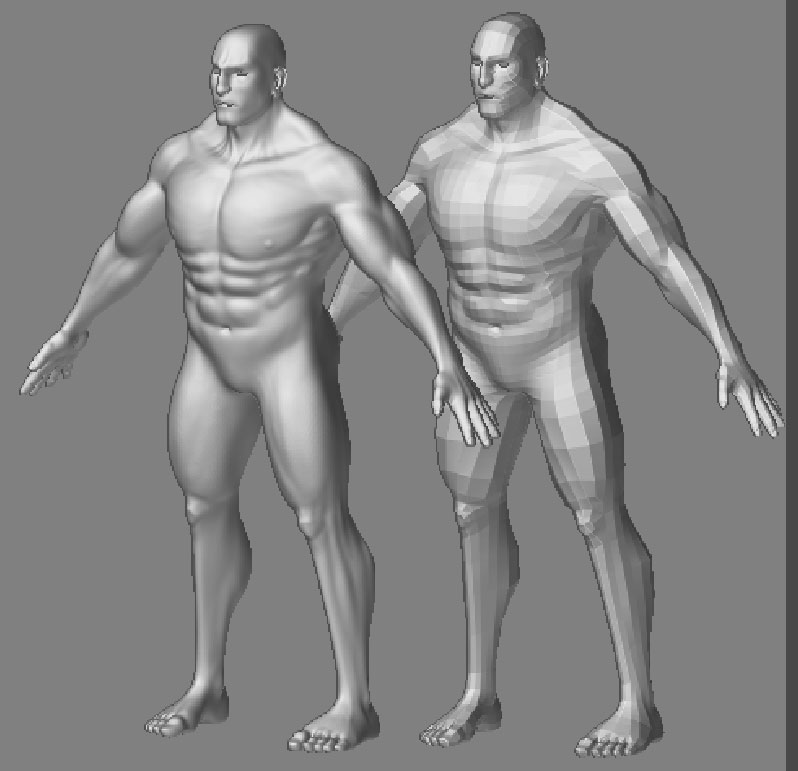
2 - I imported the model as a Tool in ZB2 and sculpted it til reaching the desired level of detailing. Model was fairly decent looking for a first Zbrush experience, here’s what I get :
ZB_snap.jpg

So please oh please, I would love to move on to some more exciting Zbrush adventures… but I’m stuck here.

Thanks, kind regards,

Adriano

Attachments
DspMap_Corrupt.jpg

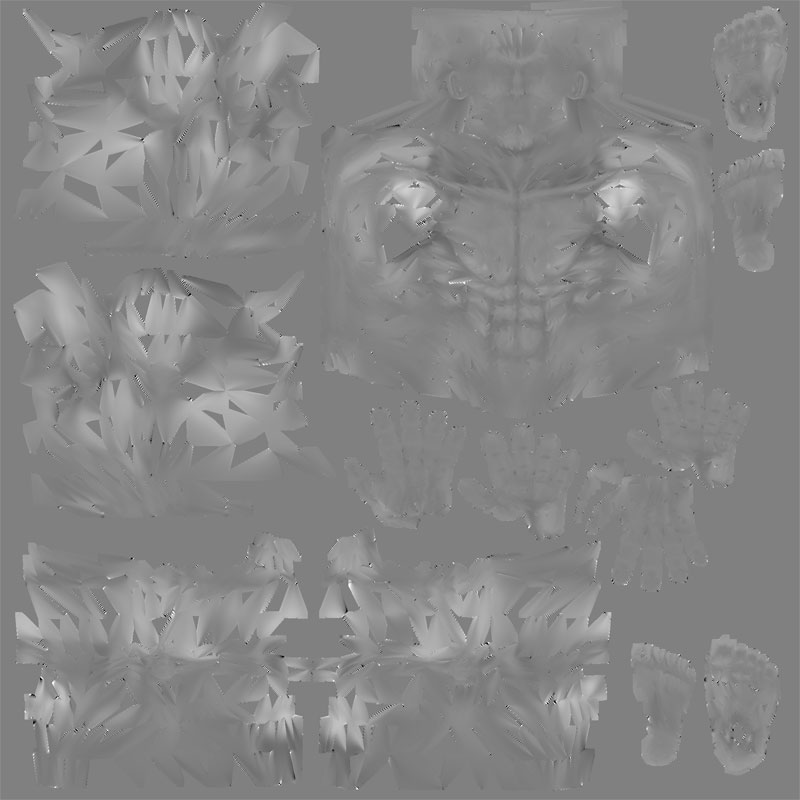
:smiley: I see 74 visits on my thread already and no suggestions whatsoever…my guess is maybe I wasn’t real clear about my request… if you look closely, the displacement map is really nasty, I have no idea what to do to be able to create a smooth one.
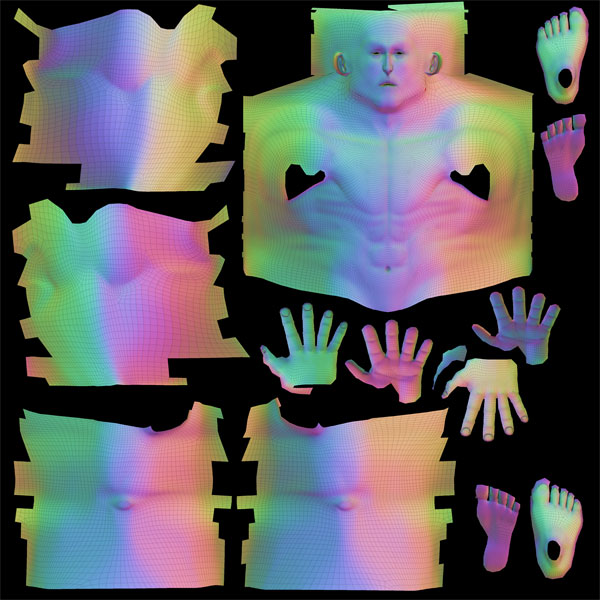
I did read the post concerning Displacement map in external renderers, it just doesn’t solve my issue here.

Any help would be much appreciated.

pe@ce,

Adriano

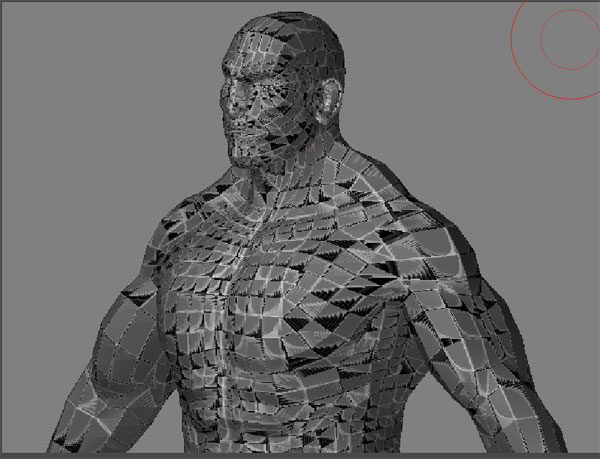
I did read some more about the topic… and did a UV Check on my freshly Imported (Max exported as OBJ) model… and here’s the result :

ZB_UVCheck.jpg

So I really wonder what goes wrong during the OBJ export, my model is clean, my Unwrap seems quite good too.

Help!

thx

Attachments

Texporter_Unwrap.jpg

Hey Adriano,

Thats really weird. Have you tried scaling up your model in max? Your model looks fine (all the verts are welded right ?)

Yup, they all welded properly, I’ll double check again… the only thing is that the mouth and eye are open… but that doesn’t seem to cause troubles to other people around…so I duno…:confused:

Your problem is that you’ve probably mirrored one half of your model and then attached and welded the two pieces together. This looks OK in max, but it will screw up your face normals and the UV mapping during an OBJ export.

Solution: before exporting the model, apply a Reset Xform from the utility panel, collapse the stack, and then you’ll probably have to flip the normals in edit mesh subobject mode.

I don’t know if you’ll be able to re-import this model into your level 1 Zbrush mesh… the vertex order might get ruined with reset Xform. But it worths a try…

Ly, thanks for your reply, however I didn’t get a chance to try your option as I SlickTom had it right I guess. I had just a couple of vertices left unwelded in my poly, 2…one on each hand, I welded em. But this time I exported my model using triangles rather than poly in the OBJ export options. Right in ZB2 I did a UVCHeck which was pretty clean although wire lines seemed quite thick in the ZB viewport. I made a random push/pull over my object and tried to export my displacement map… it worked. imported in max the Map was reversed, so I mirrored my displacement map and everything looks just perfect !! I tried a render and the seams are invisible, you have no idea how happy that makes me right now, sure I have to re-Export and re-sculpt, but at least now I know it will work!:smiley: :smiley: :smiley: :smiley: :smiley:

pe@ce,

Adriano

An other update concerning my issue, I wouldn’t want to put others who would encounter the same problem on the wrong track if they ever check my thread.

Ly was indeed right! …sure Exporting as trinagles somehow fixed my UVz issue, they appeared properly afterward… but what I didn’t notice in ZB2 at first is that the Subdivision was making lots of pinching on my shape, obviously as it wasn’t model with Triangles but mosty with quads and Polys.

So I gave a try to the reset X form before exporting, changed my export settings to the bare minimum :

Export_Settings.jpg

…and now after UVCheck in ZB2 and export of the displacement map, it’s just all goooood!

Thanks LY !!, thanks guys.

Pe@ce

Hello,

i’m actually having the same kind of issue. First thing i do is export my model using quads as the small tutorial suggests in the Practical guide for max users…Then once imported as a tool i sculpt the base mesh to whatever level of detail. I usually work with the divide level around 4-6 then lower it to 1 to create my texture map 4096x4096 and create a displacement map. The disp. map only shows as an alpha channel when i use divide level 1, is that normal? Anyway, i export the model and the disp. map then flip the texture -1.0 in the mat editor but for some reason its still not showing the level of detail i see in Zbrush and things usually look kinda crappy or out of place. What im asking if you would be so kind is a small list of steps on how you import and export the mesh, texture, and displacement from beg. to end. I would really, really appreciate that. Thank you in advance.

-Bill Noble

P.S- I’ll post some shots of what im talking about as soon as i get back home.

Hey dude, as I mentionned above, I finally got there by following Ly’s advice and reset X form the model before exporting out of Max, for me it was a UVMap issue in Max that was messin up the displacement map in ZB2, had to make sure then that my export was clean. Look at my export settings above and you’ll see that they’re set to the bare minimum. Even though I chose “quads” to export, it doesn’t even seem to be an issue as there are some triangles and even Ngons on my model, I sure did avoid to push and pull too mush on those specific triangles and Ngons in ZB2 not to get any bad deformation and pinching, but it was never an issue for the proper display of my maps afterward, they all came out clean in Max when using em in my materials. I can’t say much about importing the model Back as I just don’t do that, I don’t export it out of ZB in the end and keep workin with my original Max model.

I can tell you more about my lil methods here, but they’re not so academic. For instance as I render with Brazil I do not use the displacement map at material level as Brazil don’t handle Micro-triangle displacement (yet) but directly onto the model using a displace modifier, it work for me saving an incredible amount of time at render and giving me decent enough results.

pe@ce,

Adriano

I kiss you LY !!! i’ve been stuck with this problem for so many hours searching and there i read your answer and it solve the problem!!! I LOVE YOU!!! omg