ZBrushCentral

Displacement map destroyed on export.

Hi,

I’m running into a nasty problem. I want to export my displacement map as a 32 bit tif file. However when using DE to export the created alpha the image is turned into a flat grey image. All displacement data is erased and a flat grey tif file is the result.
I can export it as a 16 bit tif or with the pn32 settings.

I’m running zbrush 3.1 on XP x64.

I will upload some screenshots when I get home.

Does anybody know how to solve the problem???

Thanks in advance,

Joost Bouwer
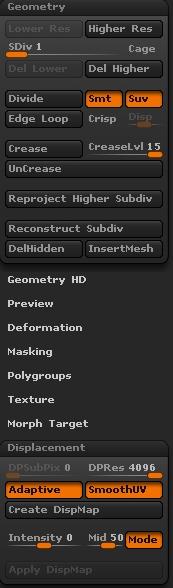
Could you describe the steps that you’re following and the exact settings that you’re using (including those in the Tool>Displacement menu)?

Well, the model has a custom UV map and imported as a obj. After that it’s detailed and textured in Zbrush.
I go back to it’s lowest subdiv level and open the displacement dialog.
displacementsettings zbrush.jpg (reduced version. original is 32 bit tiff. resolution 4096x4096)
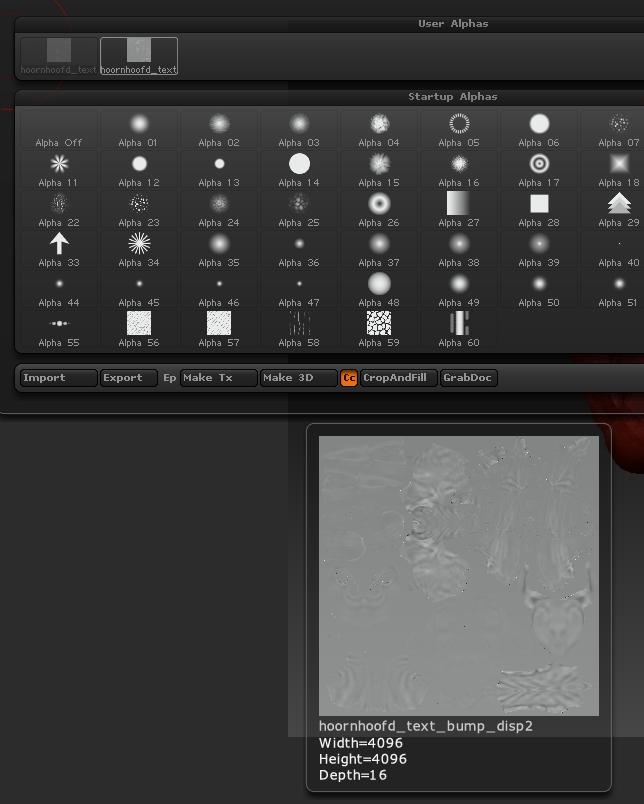
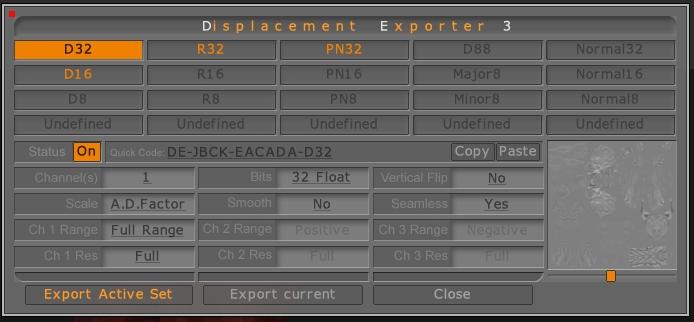
What does help is when I switch the scale factor from A.D. factor to auto. That actually solves the problem. But I still think it’s usefull to give you this information.

Thanks,

Joost

Attachments

alpha_overview.jpg

SS-04.23.2008-07.53.34AM.jpg

hoornhoofd_text_bump_disp2+D32.jpg

what program are you taking this displacement to. Maya(mental ray)?. I would turn off the smoothUV as well. when you let me know the renderer you are using I will give you some more ideas.

Actually, I’m trying some differrent renderers. I’m experimenting with a Zbrush to blender pipeline but eventually want to use a Renderman compliant renderer. I will try it in XSI as well (Mental Ray).

What is the potential risk of using the smooth uv option?

I believe that the problem is due to the fact that you’re using a 32-bit displacement code on a 16-bit map. Any image that is in the Alpha palette is going to be a 16-bit grayscale. ZBrush cannot display 32-bit maps, and using the Create DispMap button will create a 16-bit image.

To get a 32-bit map you should not use Displacement Exporter, except to enter the settings. After the settings have been taken care of, you need to use Multi Displacement 3 to create the map. This is found in the ZPlugin palette. It will calculate the 32-bit map internally and export that directly to file.

yes you want to use MD3 for 32-bit and for mental ray keep seamless off. SmoothUV is asking the ZBrush to do calculations, it’s better not to have ZBrush do that. I have always gotten a better displacement with that unchecked. Here are the settings I use for mental ray in Maya:DE-LBEK-EAEAEA-R32.

Aurick: No, it’s not. MD3 give the same results. The only file with graphic detail is the one with the PN32 settings. That file looks like this:
hoornhoofd_disp31001+PN32.jpg
I don’t know if the black background is expected with this settings but at least this one is something that looks like a displacementmap.

Joost