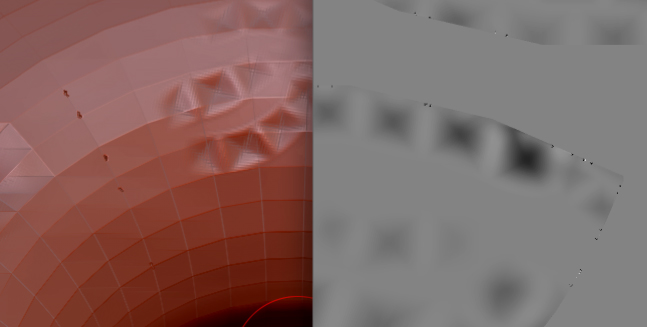
When I create my Displacement Map by clicking Create DispMap, it does a drive-by and fires off a bunch of rounds into my object along the uv borders, saturating it with much unwanted bullet holes.
I’ve looked for solutions in the forum. Haven’t found any. Yet.
To make my displacement map I reimport my obj at the lowest level.
I’ve tried various settings, including:
changing the map resolution,
changing the UV Map Border (tried all settings)
Increased DPSubPix,
Tried with Adaptive,
Tried with SmoothUV on and off.
I’m including an snapshot of the object, and the displacement map.
Just the be clear, the holes / dark spots, ONLY appear after making the displacement map, and are NOT spots I painted.
This is just a super simple test object (toroid) with UVs created in UVLayout.
Attachments