ZBrushCentral

Displacement generation trouble

Hi there!
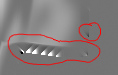
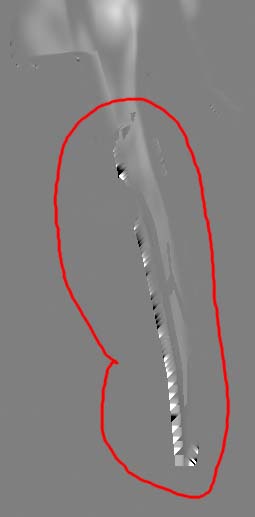
I apologise in advance if this question has been posted before, but I am getting weird bugs when generating displacement maps in Z brush. I am exporting my model from max using the settings for object format found on this forum. Then, after sculpting the detail in Z, I will morph the low rez version back to its original state, then generate the displacement map. The problem is ilustrated in the images I have uploaded with this post. It seems the displacement generator is having trouble with the edges of detail zones, creating harsh triangle strips. Is there something I am doing wrong or is it a bug? What is strange, is that this will only happen on certain models, on others it works fine.
Any thoughts on this would be apreciated.

Thanks!:stuck_out_tongue: Displacement.jpg

Attachments

Displacement02.jpg

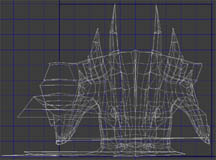
Could you show the model and its UV mapping?

I cant show the model, and the unwrap is just a simple cylindrical mapping to
see if z brush data can be trasfered back on to original max unwraps. But here is the unwrap. Would the quick unwrap job be causing this sort of problem? The model is built with quads, with no weird, long tri’s anywhere. I export it as quads as well.
Thanks for your time.

Attachments

Unwrap.jpg

There are two problems: 1) I can’t see the map clearly enough to make much out from it. 2) I can’t see where the problem area lies on the map.

Basically, what I’m trying to ascertain is whether the problems that you’re showing are inside or outside the UV borders. If they are outside the borders (which I suspect is the case), then it’s nothing to worry about. If it’s inside the UV borders, then we need to dig deeper. But that’s going to be hard to do without being able to see more than bits and pieces.

Sorry for the lack of images. But I can tell you that I have had these problem areas inside the uv borders. I wil try to reproduce this problem on something I can post.

Thanks.

Are you sure that the artifacts manifest themselves in the actual displacements? I’ve seen similar behaviour in a map for one of my models, but the artifacts were always outside the UV borders and never affected the model.

If your artifacts are inside UV borders that might because of the cylindrical mapping. With a cylindrical projection several of the model faces are sharing the same texture space, and border artifacts are overwriting other texture space. Displacement maps require unique UVs for all faces.

Hei;
I’m with Langsuyar about your problem. I can see from your unwrap
that you have overlapping UVs at some places, and you might need
to consider remaking the Uvset again. If possible you could try to
relocate those overlapped UV faces manually followed by a range of
relaxing to see if you can get a nice distribution av UVs (checher
texture makes a good guideline here)

Good luck!

Thank you for your replies.:slight_smile:

I do believe you are right. After applying a z brush unwrap (guv) then exporting the low rez cage, I was able to get accurate results in Max with a displacement modifier. Intersestingly enough, I tried Max’s automatic unwrap methods to lay out the uv’s flat, but when Z brush tried generating a displacement map for that model, it crashed. No big deal, but there you have it.
So when I unwrap the final model for real, I’m going to have to take extera care
to not let any UV’s overlap.

Cheers all.:+1:

Cool. Also play around with the DSubPix slider and the Adaptive button when creating displacement maps. Both options should give you better results in detailed areas.