ZBrushCentral

discrepancy between pixologic Tutorial and Zb4R6

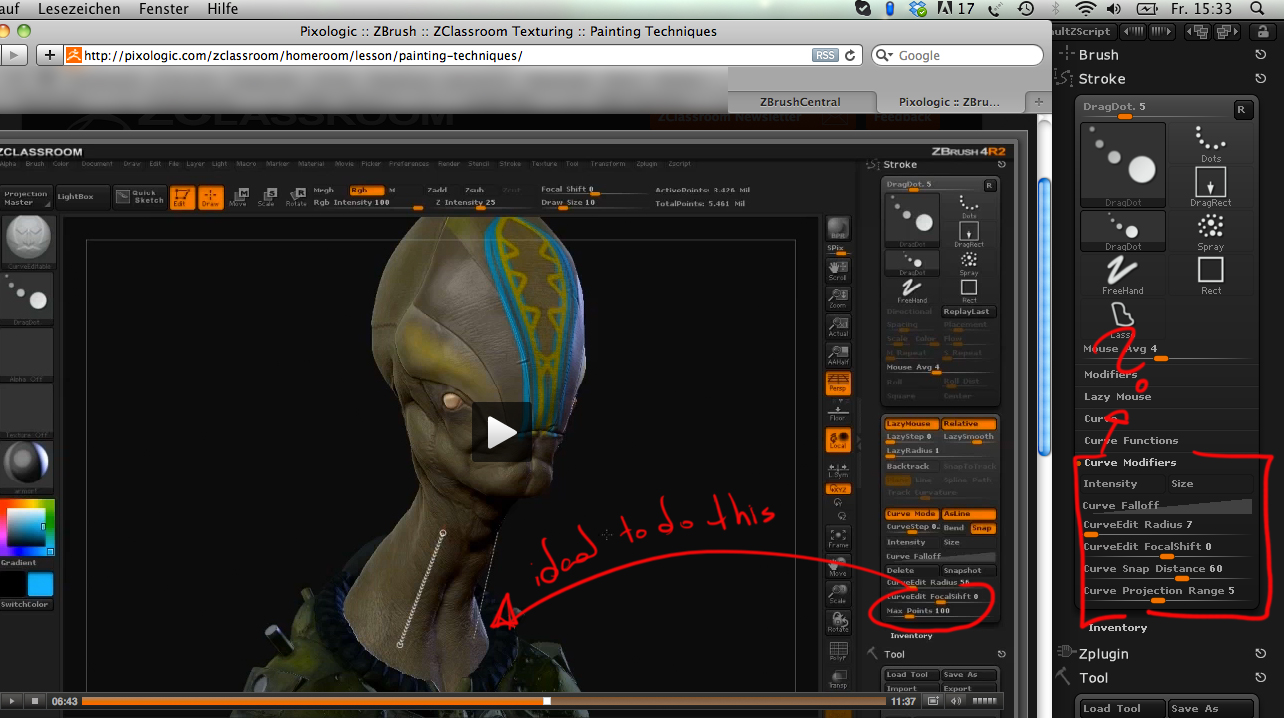
In the Pixologic - Texture>Painting Techniques> Curve Editable Polypaint Tutorial is a “max point” slider shown, that i can´t find in 4R6.
Great Paint Technique, but because of this, is impossible to make a real use of The Tutorial and the Tool!

Did i miss something? is the function under another name?

It would be really helpful to find this out guys :smiley: !
thanks!

Attachments

Discrepancy.jpg

Some stuff has been relocated…screen grab is hacked off; Do you have ZB4R6 P2? It might be under brush modifiers.

See this thread.

Attn. marcus_civis … If you see this, there is still a reference to the Max Points slider in the online docs here, under CurveEdit Radius section.

Hey guys

Thanks for the info, finally i could understand how it can be done :slight_smile:

Doug Jones: Im using ZB4R6 P2, and that means they put the “max point slider” complete out of the Software.
The effekt can be achieved in another way, but it´s difficult to have a real control of the amount & Size of the Points in the Curve.

Zber2: Thanks for the Thread, it really help! And yes, there is a reference made to the Max Point slider in the online Docs, precisely that´s what have being keeping me searching the Function.

You can achieve the same effect, by drawing a Curve with the CurveEditable-Brush in higher Size, and then reduce the Size of the Brush. At the moment you reposition the curve over the object, the curve sets color-Points on the curve steps.

We will have to wait, they are working on it :slight_smile:

Many thanks, have amended that. :+1: