ZBrushCentral

Disable LightBox showing up.

Hello,

relatively new user of zbrush here. been trying to teach myself along with a book. one problem i have though, is whenever i start zbrush the light box opens as soon as i move my mouse. i checked my preferences->lightbox->open at launch and it is disabled however it still continues to open. i cant seem to find an “about” dialog box to find the exact version i am using but i am using zbrush 4.

does anyone know how to stop this very minor annoyance?

thank you
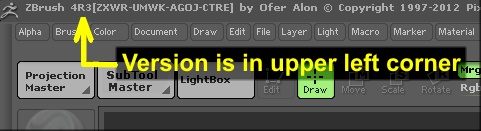
version.JPG

Are you on Mac or PC?

im on mac.

it just says “4” in the corner. no other numbers of letters.

Is there a reason you haven’t updated to version 4R3?

Copy the Code here and paste it into the DefaultZScript.txt in your ZBrush 4.0/ZSCripts folder.

Are you using the ZBrush 4 Trial version?

omg thank you so much.

it opens but then quickly closes. no big deal. really appreciate it.

no im using the normal zbrush 4.

***12354;***12426;***12364;***12392;***12358;***12372;***12374;***12356;***12414;***12375;***12383;***12290;

ZBrush 4R3 is much better than ZBrush 4.0. Is there any reason for not having upgraded yet?

im sure i will soon. just havent gotten around to it yet. still trying to master the basics.

Well, in 4R3, the basics are still the same, but the additions are friggin’ awesome!

I’m just an old fart, so excuse me, but I’m just curious as to what this means, if anything. :wink:

apparently this forum doesnt like eastern character sets. the numbers must be the UTF-8 or maybe UCS-2 character codes for “thank you” in japanese.

OK, that explains it. Thanks!

Also, I forgot to mention this before, that ZBrush upgrades are still free in case you didn’t know. The reason I mention that is, that I have seen some people not upgrade because they thought they would have to pay for it.