ZBrushCentral

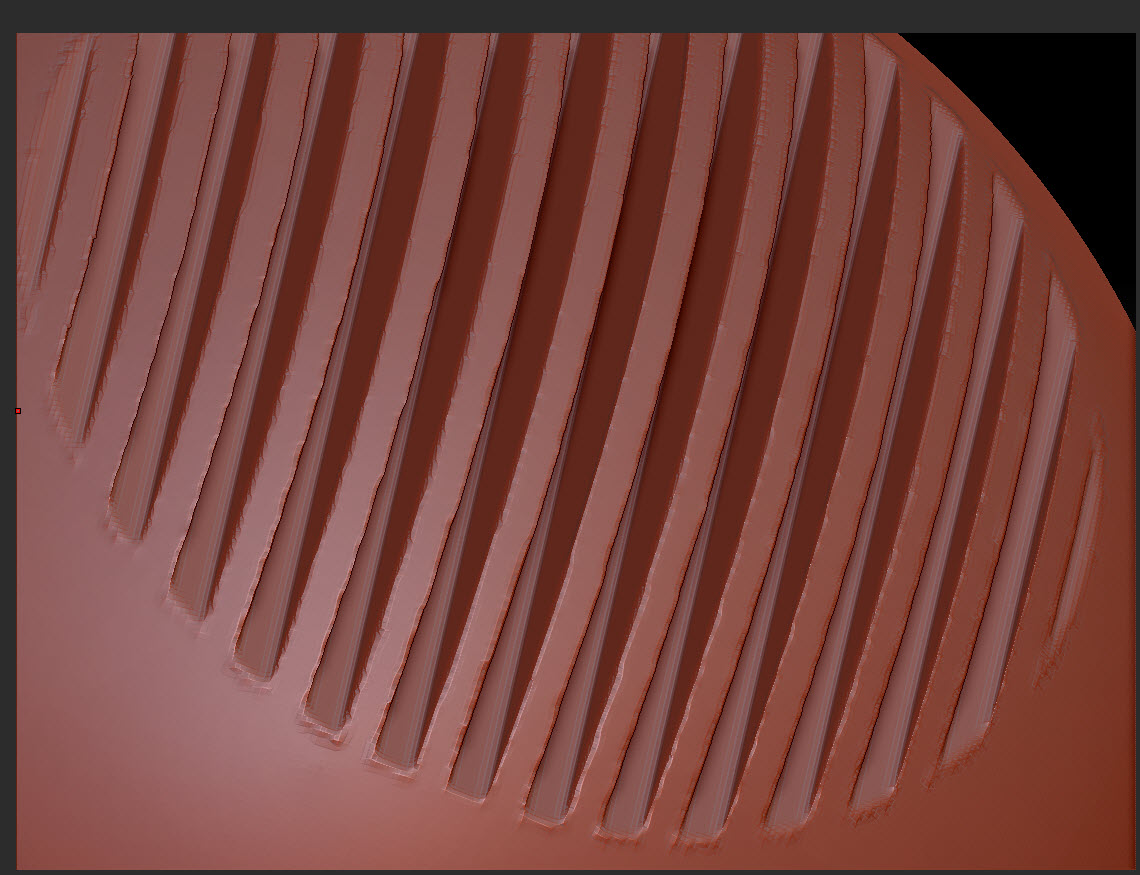
Dinamesh substract Jagged galore

Hi there!, Im new using zbrush in my workflow, Im having this issue with a gun Im making, my biggest issue is that I scaled the weapon to about 1 mt in 3dsmax, to avoid this kind of stuff or clipping, and Im ussing 2048 dynamesh resolution so I cant go further, still I have this jagged borders when I substract details, is there any magic formula Im missing? I always see awesome detailed weapons all over zbrushcentral :confused:

Attachments

issue sample.jpg

any idea?? I guess its a kind of frequent question, I just asked help to a super pro friend but couldnt find a solution either, we tried scaling the object and didnt improve at all, what does resolution depend on??? I cant find any info on it, and Im using the maximum allowed by zbrush…

Resolution depends on the size of the mesh. You’ll want to check out how it looks in zbrush, using the Tool: Preview window. If the mesh is smaller, you get less out of Dynamesh. I wouldn’t worry too much about the final scale in Max until you have the model finished. Be sure to break your mesh into parts. Ideally you don’t want to be dynameshing the entire object just to work on details in one area. Also be sure to have the Project option enabled.

thanks for the info :slight_smile: , I’ll try that.

Also, dynamesh isn’t the end all be all. Dynamesh is best used for volume/silhouette changes. After that, use regular subD levels. Once you get your mesh as dense as you want you can always use the polish brushes, etc to clean up any artifacts that dynamesh creates.