ZBrushCentral

different subtools with different Materials + Texture???

HI
Is it possible to use different Materials for the subtools?
I tried so, but in the moment I applied a texture to one subtool ALL the other subtools got the actual material. I have attached a picture which will hopfully explain what I want to do.
[zombieMat.gif]
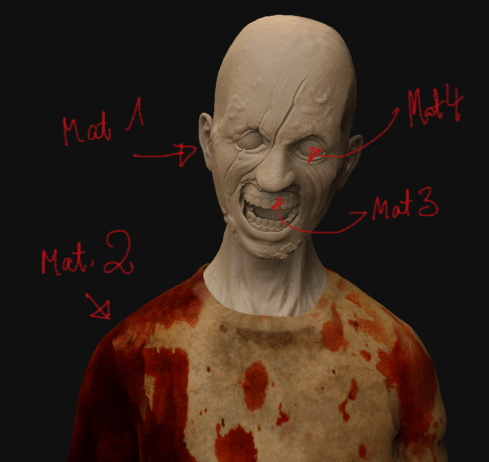
I thought of painting a texture for each subtool and use different materials for them, because the eye needs more reflection than the shirt and so on…

Did I miss something?
Thanks for your help.
Kind regards
Hilmar

Yes, you can assign different materials to your SubTools.
Make sure that Mrgb is turned on, then click on the Fill Object button which can be found in the color palette.

Please see here for detailed infos and a step by step explanation:
http://www.pixologic.com/docs/index.php/Materials_and_SubTools

Oh, Im not sure if youre talking about different materials or different textures. In case you want to know how to assign a texture to each of your SubTools please see here:

http://www.zbrushcentral.com/zbc/showpost.php?p=500672&postcount=2

Have you already painted on the shirt? If you want to change the shirts material and keep the painting you need to turn on M instead of Mrgb before you click on theFill Objectbutton. I hope Ive understood things right :slight_smile: and I hope that helps.

I thought of ending up with one texture and one material for each subtool.
I think I got it.
It goes like this:
first paint material and texture/polypaint onto each subtool. Export each texture and tweak it in PS. If you want to load them back in and assign it to the object, you have to use Txr>col. Otherwise the texture will be shown at every subtool.
Thanks a lot for your help.
Hilmar