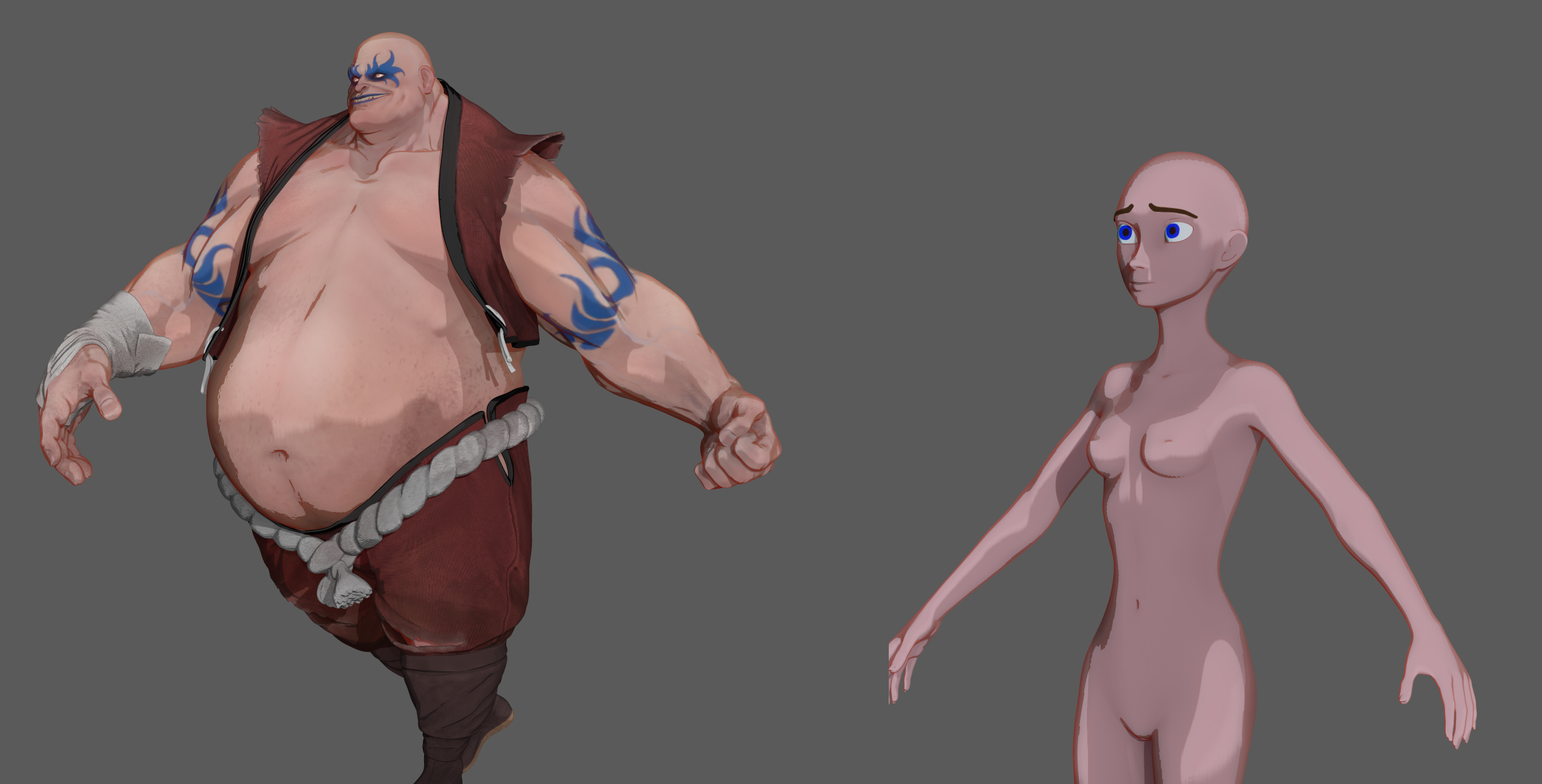
Well, first of all, let’s try to ignore all the additional subtools and polypaint of the model on the left. That model has clothing, it has coloring, it has more complex geometry, it is posed in an asymmetrical fashion. All these things are going to add up to give that model a more detailed, more living, more refined look.
Instead, let’s just look at the flesh portions of each model. You’re using some manner of cel shading, and it renders “lines” where it encounters boundaries or significant differences in depth. The model on the left has a much more varied surface. It has a gut that stick way out to catch the light, as well as dimpled recesses in the face, pronounced folds of flesh, and defined musculature. Each of these things stands out by either catching the light, or by being a prominent enough feature or cavity that the cel shading material renders a line there.
By comparison, the model on the left doesn’t have many extremes, contrasts, or well defined features. It is uniformly slender, and lacks prominent detail. Start modeling in some bulges and wrinkles, and you’ll see more detail at render time just from the variation in surface topology. Then give the figure some clothes. Give it a coat of paint. Pose it in something other than a T pose. You’ll start to see it come alive much more than it is at present.
 cant figure out why