Hello! I’m relatively new to ZBrush and have just started using it. I use “Poser” a lot and I wanted to make some modificatons to a Poser figure by importing it in ZBrush. I managed to export the figure from Poser as an “OBJ” and then import it into ZBrush and do a little sculpting here and there. However, the problem I am facing is that Poser figures have very weird and big eyelashes (pls see image below).
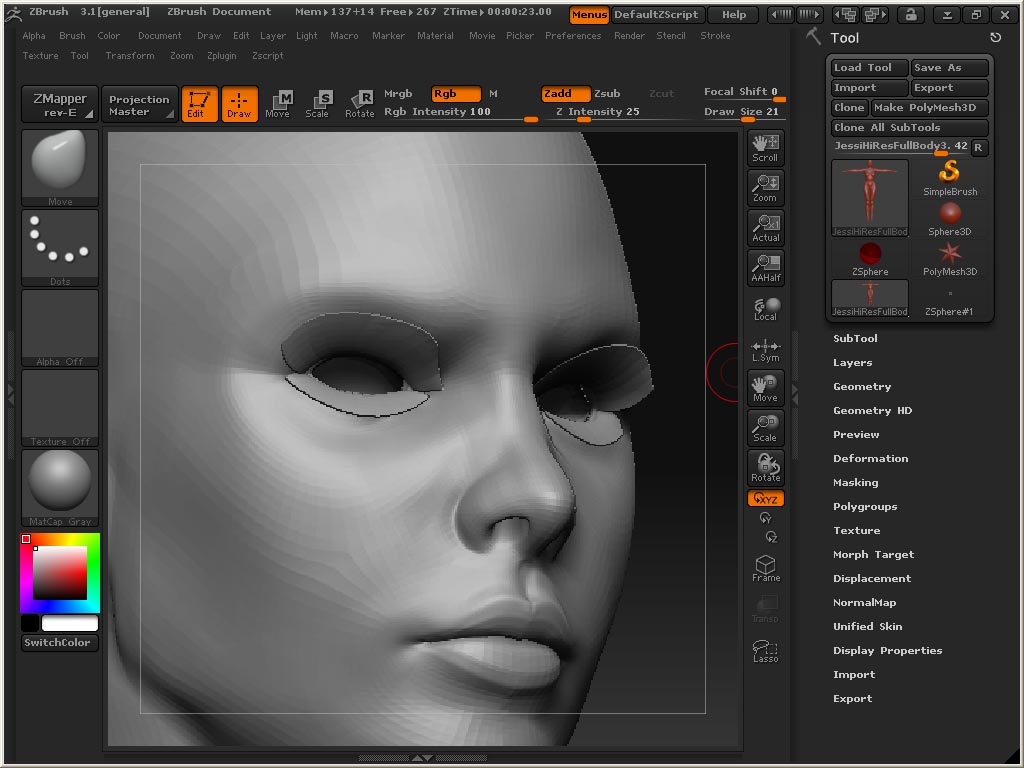
Now I want to remove/delete those lashes which are actually a part of the mesh. I searched the web regarding deleting part of the mesh in ZBrush and found a couple of sites which say that it is possible to do so by editing the Topology. So I tried following the steps described by one such website i.e.
- Click on “ZSphere”
- Go to “Tools: Rigging: Select Mesh” then select the figure
- Go to “Tools: Topology: Select Mesh” then select the figure
- Go to “Tools: Topology: Edit Mesh”
After doing the above steps, I don’t see the rigging in the figure (i.e. the dots which make up the topology, even though the tutorial says that I should.
Could someone please explain to me what I am doing wrong in the Topology part or better yet, if anyone has a simpler method of deleting the lashes, that would be great! Thank you