ZBrushCentral

Deformation and Subdivision Level Issues

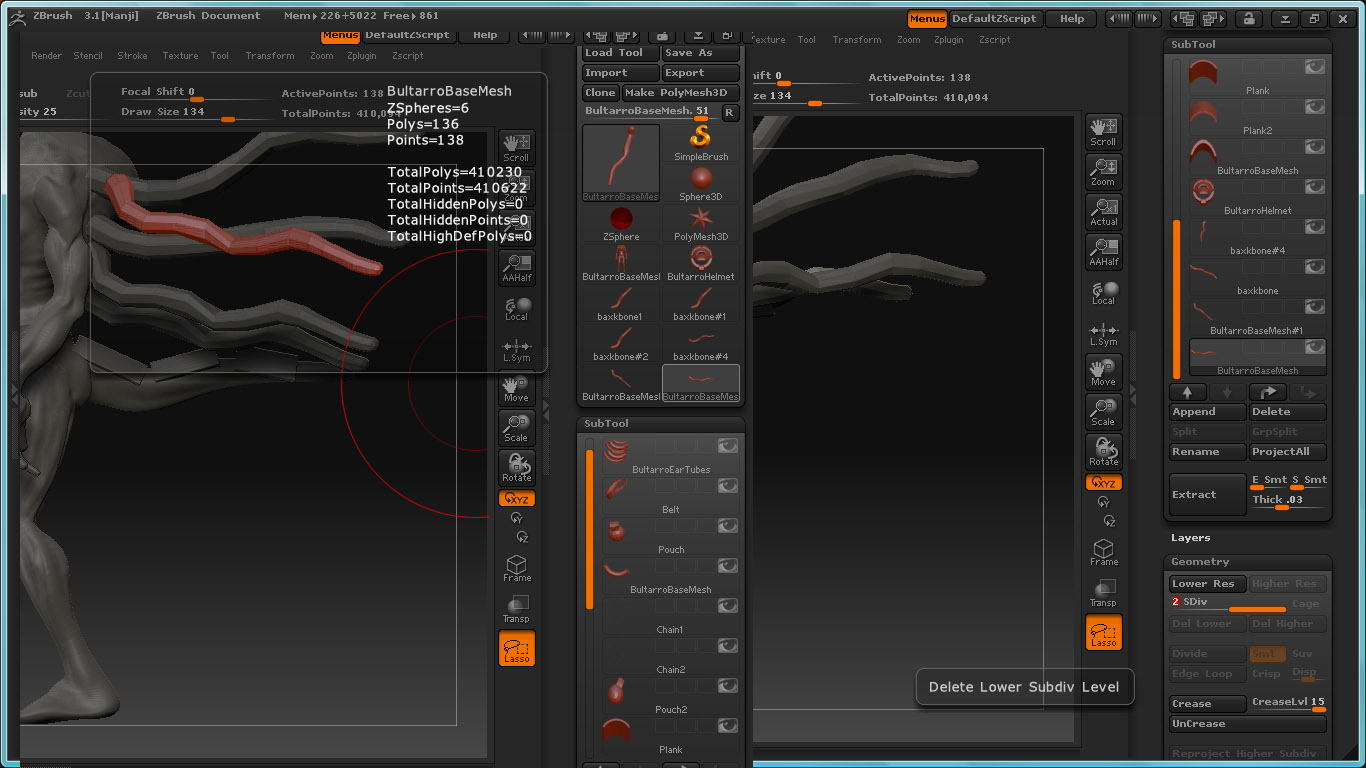
Hello, I am new to Zbrush and constructing my first model. I’ve run into a problem where I need to mirror one of my subtools, for this option I need to have only one subdivision level on my tool.

  • The option “delete lower/higher” is grayed out on some of these tools or completely missing.

Any help would be appreciated :slight_smile:

Attachments

issue.jpg

is part of the model hidden?

HI Goast, absolutely nothing is hidden on the selected subtool itself or the other tools.

zsphere?

Yes, an adaptive skin made from a zsphere

Hmm. I cant figure that out but i can give you a work around.
Export out the highest. Then import as a new tool. Append then new one as a subtool. Then reconstruct the lower subDs after you mirror.

Not pretty. But it should work.

It looks as though those subtools are ZSpheres in Preview mode. You need to convert them to Adaptive Skins before the delete higher/lower options become available but in your case, as you don’t want the lower levels anyway, simply go to the highest level and press Tool:MakePolymesh3D. Then append as a subtool and mirror before reconstructing the subdivision levels.

HTH,

Marcus, thanks! :slight_smile: That actually solved the problem of the missing “delete lower/higher” tabs - but as for the ones greyed out those are actually adaptive skins, not in preview mode, so I still have no idea why those nodes are greyed out …

Goast- I went ahead and followed your advice, works, thank you also :slight_smile:

Still haven’t exactly figured out why those nodes were greyed out but at least got the other issues solved and can move on with the project, thanks again guys/girls :slight_smile: