Hi,
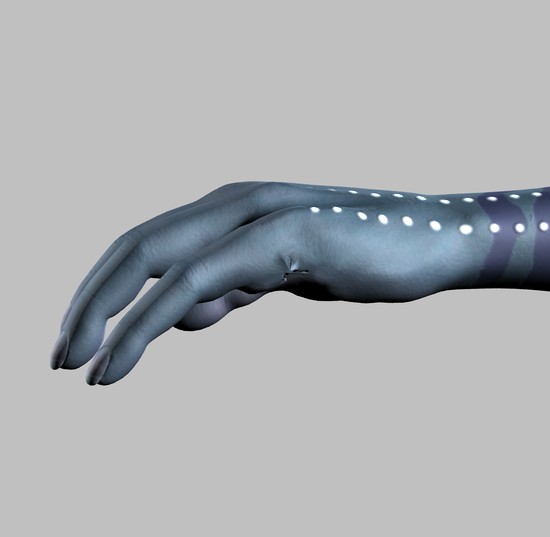
I’m creating some morphs for Victoria 4 (and eventually Michael 4), they are 4 toes, 3 finger and then onto the faces (Na’vi). I got the toe morphs done fine but the 3 finger morphs I keep running into issues when imported into DAZ Studio. They look a bit sloppy. The shape is good but where the pinkie was looks a bit misshapen.
My question mostly pertains to those that have good knowledge of how to use a brush to work a piece of mesh down and possible invert and push it into the main mesh to hide it and then figure out a way to close the hole without adding additional mesh (the obj must have the same vert count as when it was brought in or the morph won’t work).
I’ve tried using the smoothing brush but that breaks the joints up too much and then that’s where it gets messy so I can’t use that too much (small doses here and there work but nothing too strong). I’ve tried using the Flatten brush but that’s not good either.
I’ve uploaded a little render of the hand. As you can with the textures applied and rendered it looks sloppy. I can do better but I really need some ideas of what brushes to try next.
I’m stuck and with the expanded brush selection in ZBrush 3.5 a bit confused as well.
Thanks so much
Richard ;-)~
Attachments