ZBrushCentral

Custom UI problem.

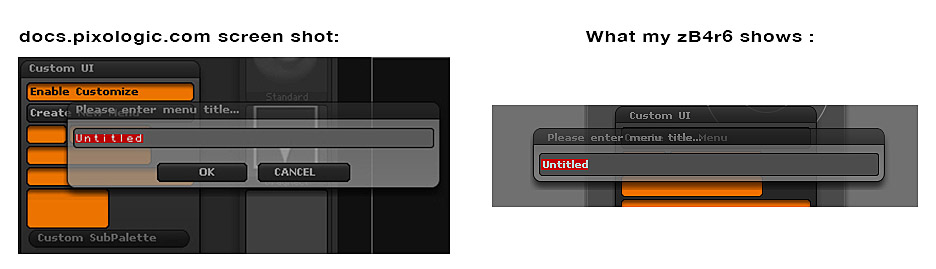
I’m trying to create a custom U I and I’ve encountered a weird issue. According to docs.pixologic, I’m supposed to name my new customized menu title and hit OK before I can move on to any further steps. but my dialog box for this procedure does not display any OK or CANCEL buttons, and doesn’t allow me to move past typing in a name. Any reasons this may be occurring? I’m not sure I’m doing anything wrong. relevant info: using iMAC i7, osX-Mavericks, zB4r6.

Attachments
Custom7.jpg

Did you type something in and hit enter?

Yes, nothing happens. In fact, I can’t even get out of this window without Force-quitting.

The OS is my guess.

Damn. Between this and the sticky-lagging curser, this is getting ugly.

The dialog box is as it should be for 4R6 - there are no longer OK and Cancel buttons and the docs need updating. Instead pressing Enter should accept the text entry and pressing Esc cancel it. As Doug says, this may be an issue with mavericks. I’ll pass this on to the development team.

Thanks so much for replying. I’ll try it again and with a clearer head. Perhaps it will work next time around.