ZBrushCentral

Custom UI empty - Store Config bug?

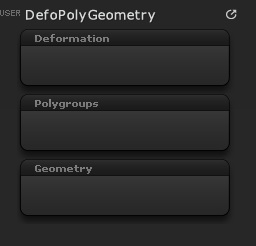
I went through the process of creating a custom menu (Preferences > Custom UI > Create New Menu), adding Custom SubPalettes and hit the Store Config button (received positive feedback). When I restart ZBrush, the custom SubPalettes are empty (see image).

I tried it again, this time also storing the UI to a separate file. If I load it, it’s also empty.

I couldn’t find an answer in a google search and I’m quite sure I didn’t make a mistake - anybody have a suggestion?

Attachments
CustomUI.jpg

Install the plugin at the bottom of this thread to see if it helps:

http://www.zbrushcentral.com/showthread.php?160733-ZBrush-4R2-Troubleshooting-FAQ

Unfortunately it didn’t work. I put the .zsc file (the one from the .zip file) into the ZPlugs folder. Tried it once within its own folder, then without a folder (inside the zip file is a Folder named UIStarter_Z4R2_V1.zsc and inside this folder is the .zsc file called _UIStarter_Z4R2_V1.zsc).

I have a registered (legal) version of ZBrush4 R2, Window 7 64-bit, 6 GB RAM. Don’t know why it should only be buggy on some machines.
I was watching a tutorial and the guy had a custom UI with elements from the Deformations palette etc… So it must be possible.

Any ideas?

What, none at all? What items are you saving to the custom menus?

Yes, the image I posted shows the results. I was trying to build the custom UI from the Eat3D tutorial video I bought. I had the elements he used (see image below). Once I had that set-up, I exited Custom-mode and saved the UI. But when I restart ZBrush, I get empty Sub Palettes, even with the patch.

Sadness.

Attachments

eat3d_example.jpg

Just to be absolutely sure: The .zsc file is in your ZStartup\Zplugs folder, right? It’s NOT in a subfolder within that folder?

If so, it’s installed right.

But if the .zsc file is within any folder at all inside the Zplugs folder, ZBrush can’t find it and that is why you’re having trouble.

All plugins install directly to the Zplugs folder. The only other folders within the Zplugs folder should be data folders for those plugins that require one. (This is not one of those plugins.)

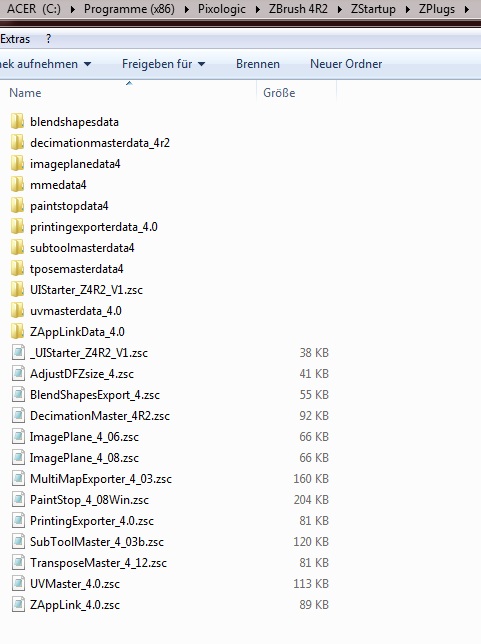
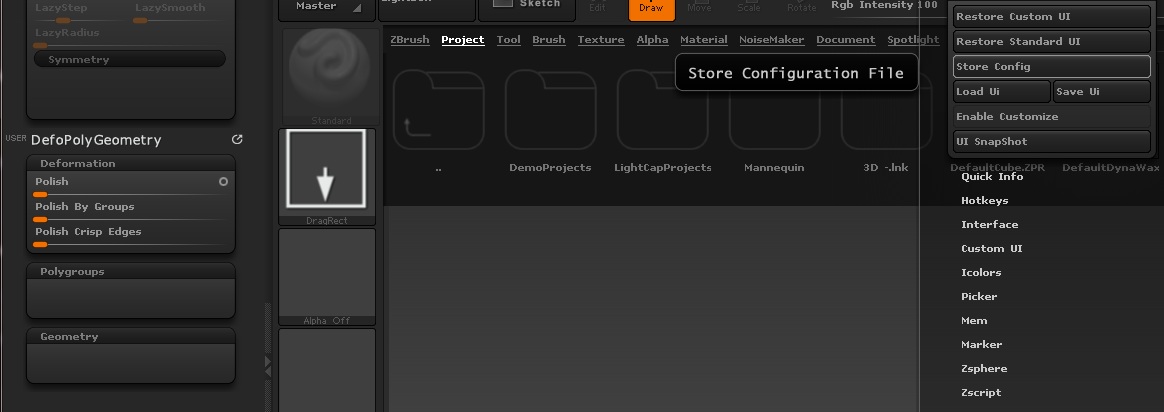
I had the zsc file in the Config folder directly and in addtion in its subfolder. I now deleted the subfolder (the subfolder is still visible when I took this screengrab) and tried it again. I pulled some elements form the Tool > Deformations palette into my Custom UI SubPalette (see second attached image) and hit the Store Config button (also visible in second image).

I appreciate you trying to help me, sorry your efforts have thus far been in vain.

Attachments

zsc_location.jpg

zsc_storeConfig.jpg

Ha, I got it to work!

The thing I did differently this time was, that I hit the “Store Config” button WHILE I was still in Enable Customize mode. Usually I would exit custom mode, then hit the Store Config button. The trick is to hit the button while still in Enable Customize mode.

Thanks a lot for pointing me to the plugin , aurik and markus civis!
It worked,I had a hard time trying to make custom menus from tool palette ,but now it’s ok.
Thanks again.